Skit Video Maker: Create Funny Skits Fast for Social Media

Stella writes SwipeStory guides about AI faceless video creation, short-form video strategy, creator tools, and automated publishing workflows.
If you want the short answer: use an AI template-first tool like Swipestory. Pick a template, paste or generate a script, choose a voice or avatar, and export a 9:16 vertical video ready for TikTok, Reels, or Shorts. The whole process takes 3–15 minutes, not hours.
Here's what makes that possible:
- Template library with pre-built comedic formats (POV, relatable observation, parody, character scene)
- Script-to-video AI that turns a text prompt or written script into a timed video automatically
- Voice and avatar options so you don't need to film yourself
- Auto-captions baked in for discoverability
- Platform export presets sized for TikTok, Instagram Reels, and YouTube Shorts out of the box
Swipestory's short-video maker has generated over 60,000 short videos for thousands of creators. Start with the free plan and see how fast a skit comes together.
Table of Contents
- How do you make a skit video in under 15 minutes?
- What features should you prioritize in a skit video maker?
- What are the best skit templates and video skit ideas to start with?
- AI vs. human-produced skits: what do you actually trade for speed?
- What does pricing look like for a skit video maker?
- How do you make your first skit in Swipestory?
- Key Takeaways
- Why the template-first approach builds an audience faster than you'd expect
- Swipestory turns your skit idea into a shareable video in minutes
- Useful resources to go deeper
How do you make a skit video in under 15 minutes?
The answer is a template plus a script-to-video workflow. Here's the exact sequence:
- Choose a template (~1 minute) — Browse the template library and pick a format that matches your concept: POV, relatable observation, parody, or character scene. The template handles pacing and scene structure so you're not starting from scratch.
- Add or auto-generate your script (~2–3 minutes) — Paste your own dialogue, or type a one-line prompt and let the AI write the script. Keep it tight: 60–90 words is plenty for a 30–45 second skit.
- Select a voice or avatar (~1 minute) — Pick from AI voice options or a faceless avatar style. You don't need a camera or a recording setup.
- Edit timing and captions (~3–5 minutes) — Trim scene lengths, adjust the punchline pause, and confirm your auto-captions are accurate. This is where comedic timing actually lives.
- Export for your platform (~1–2 minutes) — Choose your export preset (9:16 for TikTok/Reels, 16:9 for YouTube) and download or share directly.
Pro Tip: Once you have a template that performs well, duplicate it and swap only the script. Batch three variations in one session and you have a week's worth of content before lunch.

What features should you prioritize in a skit video maker?
Not every feature matters equally for short comedy. Here's what actually moves the needle:
- Templates built for comedy — A good template pre-loads scene timing, text placement, and transition rhythm. Without this, you spend more time on layout than on jokes.
- Script-to-video (text-to-video) generation — The ability to convert text into video automatically is the single biggest time-saver. Type your premise, get a timed video back.
- Voice and avatar customization — Character consistency across episodes matters. Viewers return for recurring voices and faces, not one-off clips.
- Auto-captions and subtitle styling — Captions drive engagement on muted feeds. Styled captions (color, font, pop-in timing) also function as visual punchlines.
- Export presets for social platforms — Manually resizing for TikTok vs. Reels vs. Shorts wastes time. One-click presets eliminate that entirely.
Secondary features worth checking: an asset library for sound effects and music, collaboration seats if you're working with a writing partner, and social scheduling support if you're posting at volume.
Pro Tip: Before committing to any tool, drop a 3-scene template into it and time how long the punchline lands after the setup. If the default pacing feels off, check whether you can manually adjust scene duration. Comedic timing is the one thing you can't automate away.

What are the best skit templates and video skit ideas to start with?
Strong skit formats are repeatable by design. Successful creators reuse a small set of proven structures rather than reinventing the premise every time. Here are five that consistently perform:
-
The Relatable Observation (15–30 seconds) — One character notices something universally annoying. No villain, no resolution. Just the recognition. Script snippet: "Why does every group chat go silent the moment someone asks for a decision?" Works because the viewer IS the punchline.
-
POV Scene (20–45 seconds) — Camera is the viewer's perspective. One character reacts to an invisible "you." Script snippet: "POV: You told me you'd be ready in five minutes. That was forty-five minutes ago." Grayson Kepley's "That One Friend Who Cancels Last Minute" format is a textbook example of this structure.
-
Recurring Character Scene (30–60 seconds) — A named character in a consistent setting reacts to a new situation each episode. Drew Talbert built a fictional restaurant backdrop and turned it into a recurring character series with a loyal audience. The setting does half the writing work for you.
-
Parody or Expectation Flip (20–45 seconds) — Set up a familiar scenario, then break the expected outcome. Script snippet: "When you finally ask for help and the tutorial is longer than your whole project." Fast pacing and a sharp dialogue flip are what make this land, per comedy writing principles that emphasize tight scene rhythm.
-
Punchline Twist (15–30 seconds) — Two-beat structure: setup, then a hard left turn. Script snippet: "I've been working out every day this week. Day one was Monday. Today is also Monday." Short enough to loop, which boosts watch time.
To convert any one of these into a mini-series, keep the character name, the setting, and the opening line consistent. Change only the situation. Three episodes, same template, same character — that's a series.
AI vs. human-produced skits: what do you actually trade for speed?
AI tools win on speed and scale. Human production wins on originality, timing nuance, and culturally specific humor. Knowing which matters for your goal is the real decision.
- Speed — AI + templates: 3–15 minutes per skit. Human multi-character shoots: a few hours to a week, depending on complexity.
- Cost — AI: low fixed cost, no crew. Human: time, equipment, and often location costs.
- Character consistency — AI avatars hold a consistent look across every episode. Human actors bring nuance but require scheduling.
- Originality — AI generates from patterns. A genuinely fresh comedic angle, a culturally specific reference, or a perfectly timed pause still comes from a human writer.
- Legal and ethical considerations — Voice cloning raises real questions about consent and likeness rights. Use only voices you're licensed to clone, and never use copyrighted audio or music without clearance.
"Making people laugh and staying persistent — those are the foundation stones. The platform is just distribution." — Kevin "KevOnStage" Fredericks, on what actually drives long-term comedic success, via AfroTech
The practical answer for most social creators: use AI for volume and consistency, then invest human writing time in the script itself. The AI handles the production; you handle the joke.
What does pricing look like for a skit video maker?
Most tools, including Swipestory, follow a freemium model. The free tier is enough to test the workflow and produce your first few skits. Paid plans unlock the features you need at scale.
Here's what paid plans typically unlock:
- HD and 4K export — Free tiers often cap at lower resolutions or add a watermark.
- Longer video durations — Free plans may limit you to 30–60 seconds; paid plans extend that.
- Advanced avatars and voice options — More character styles, more voice tones, more customization.
- Batch rendering — Create multiple skits in one session without waiting for each to process individually.
- Commercial licensing — If you're monetizing your content, you need a plan that covers commercial use.
- Team seats — Collaborate with a writing partner or editor without sharing login credentials.
Swipestory's free plan is a genuine starting point, not a demo. For creators posting at volume or needing watermark-free exports, the paid tier is where the workflow gets serious. Check the current pricing options directly on the site, since tiers update regularly.
How do you make your first skit in Swipestory?
Five steps, and the first one takes less than a minute:
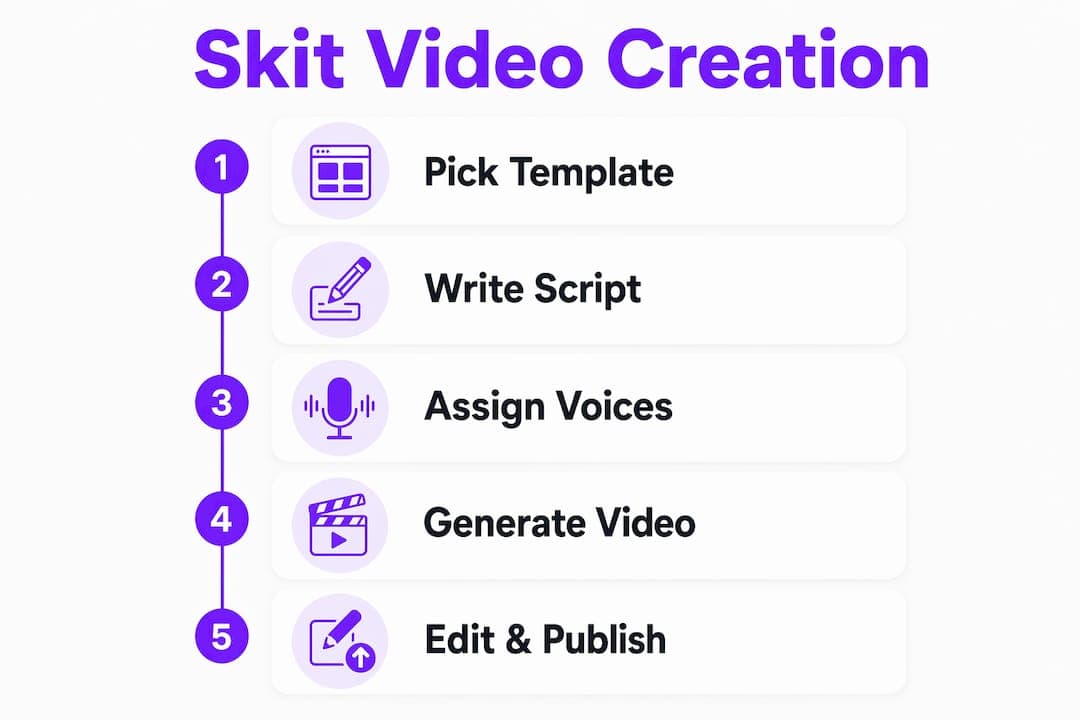
- Pick a template — Open Swipestory's template library and choose a comedy format. POV and relatable observation templates are the fastest to fill in.
- Paste or generate your script — Type your own dialogue or enter a one-line prompt. Swipestory's AI video generator handles the scene breakdown automatically.
- Choose a voice and avatar — Select an AI voice tone that fits your character. Upbeat and slightly deadpan tends to work well for observational comedy.
- Adjust timing and captions — Extend the pause before the punchline by one second. It sounds small; it changes everything. Confirm your auto-captions are accurate and style them for visibility.
- Export and share — Use the 9:16 preset for TikTok or Reels, 16:9 for YouTube Shorts. Download or push directly to your platform.
Pro Tip: Your first frame is your thumbnail on most platforms. Make sure the opening caption or visual is the hook, not a blank scene. Something like "POV: You said you'd be quick" in the first half-second stops the scroll.
Key Takeaways
Swipestory is the fastest path from a skit idea to a share-ready vertical video, combining templates, script-to-video AI, and one-click platform export presets in a single free-to-start tool.
| Point | Details |
|---|---|
| Start with a template | Pre-built comedy formats handle pacing and structure so you focus on the script, not the layout. |
| Use script-to-video AI | Type a premise and get a timed, captioned video back in minutes, no filming required. |
| Batch your sessions | Create three skit variations from one template in a single session for a full week of content. |
| Human writing still matters | AI handles production; your original joke, timing tweak, and cultural reference are what make it land. |
| Swipestory free plan | Start with Swipestory's free tier to test templates, voices, and exports before committing to a paid plan. |
Why the template-first approach builds an audience faster than you'd expect
The conventional wisdom says originality wins. In short-form comedy, predictability often wins harder.
Viewers who find a creator they like want more of the same thing, not a surprise genre pivot. That's why recurring characters and a consistent fictional world drive return views more reliably than one-off high-production pieces. The template isn't a creative limitation. It's the container that makes the joke recognizable and the character memorable.
Batching production sessions reinforces this. When you film or generate three episodes in one sitting, you stay in the character's voice, the pacing stays consistent, and the series feels intentional rather than scattered. Audiences notice that coherence even when they can't name it.
The creators who grow fastest on short-form platforms aren't the ones with the most original concepts. They're the ones who found a format that works and posted it twenty times with twenty different scripts. Templates make that repeatable without burning out.
Swipestory turns your skit idea into a shareable video in minutes
Skip the camera setup, the editing timeline, and the three-hour production session. Swipestory gives you templates, AI script generation, voice and avatar options, auto-captions, and platform-sized exports in one place. Over 60,000 short videos have already been generated by thousands of creators using the platform's short-video tools.
The free plan gets you into the workflow immediately: pick a template, generate or paste a script, choose a voice, and export a TikTok-ready skit. No watermark anxiety on your first test. No long-term commitment before you know it works for you.
| Feature | What Swipestory delivers |
|---|---|
| Templates | Pre-built comedy formats for POV, relatable, parody, and character skits |
| Script-to-video AI | Text prompt to timed, captioned video automatically |
| Voice and avatar options | AI voices and faceless avatar styles, no filming required |
| Export presets | 9:16 for TikTok/Reels, 16:9 for YouTube Shorts, one click |
| Adoption | 60,000+ videos generated, thousands of active creators |
Try it now at Swipestory's AI video generator and have your first skit ready to post today.
Useful resources to go deeper
- Script to Video AI — Swipestory's dedicated script-to-video tool; start here if you already have a script and want to skip straight to production.
- Text to Video AI — Converts a text prompt or outline into a video; useful when you're still at the idea stage.
- AI TikTok Video Generator — Platform-specific export guidance and presets for TikTok-first creators.
- Simple Video Tools for Non-Creators — Swipestory's beginner guide covering the basics of video creation without a production background.
- Prose Coach — An LLM personalization tool that helps you train a consistent character voice, useful if you want your AI-generated scripts to sound like a specific recurring persona across episodes.
