TikTok vs YouTube Shorts vs Reels

Stella writes SwipeStory guides about AI faceless video creation, short-form video strategy, creator tools, and automated publishing workflows.
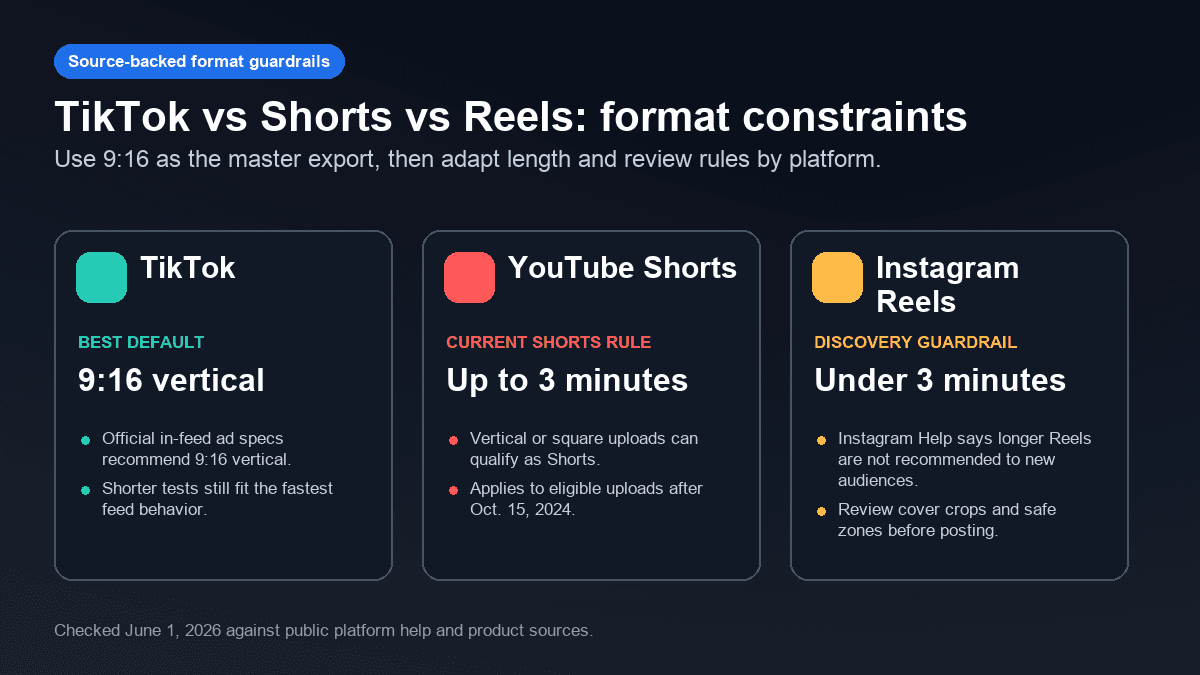
If you can only pick one platform, use TikTok for fast creative testing, YouTube Shorts for searchable evergreen series, and Instagram Reels for creator credibility and community reach. Most faceless creators should eventually post to all three, but the winning workflow is not copying the same video everywhere. Start with one master idea, then adapt the hook, title, cover, caption density, and call to action for each feed.
Updated June 1, 2026. We checked current official and product sources from TikTok, YouTube, and Instagram before writing this comparison, including YouTube's three-minute Shorts rules, TikTok's public recommendation and ad-spec guidance, Instagram's Reels recommendation guidance, and platform research tools.
Short Answer: Which Platform Should You Post On?
Use the platform that matches the job of the video.
| Goal | Best first platform | Why |
|---|---|---|
| Test hooks and angles quickly | TikTok | The feed rewards fast pattern recognition, sharp openings, and frequent creative experiments. |
| Build an evergreen faceless channel | YouTube Shorts | Shorts can support repeatable channel topics, searchable titles, and longer-term discovery beside long-form YouTube. |
| Strengthen audience trust and creator presence | Instagram Reels | Reels work well when the video supports a profile, offers a saveable idea, or builds a community loop. |
| Turn one idea into a cross-platform series | All three | The same core script can work, but the first line, title, cover, and CTA should change by platform. |
If your bottleneck is production, use SwipeStory's AI TikTok video generator, AI YouTube Shorts generator, or AI Reel generator to turn prompts or scripts into vertical videos with AI visuals, voiceovers, captions, background music, editing, rendering, and scheduled publishing. If your channel is no-camera by design, the faceless AI video generator is the cleanest starting point.
Format Rules That Matter in 2026
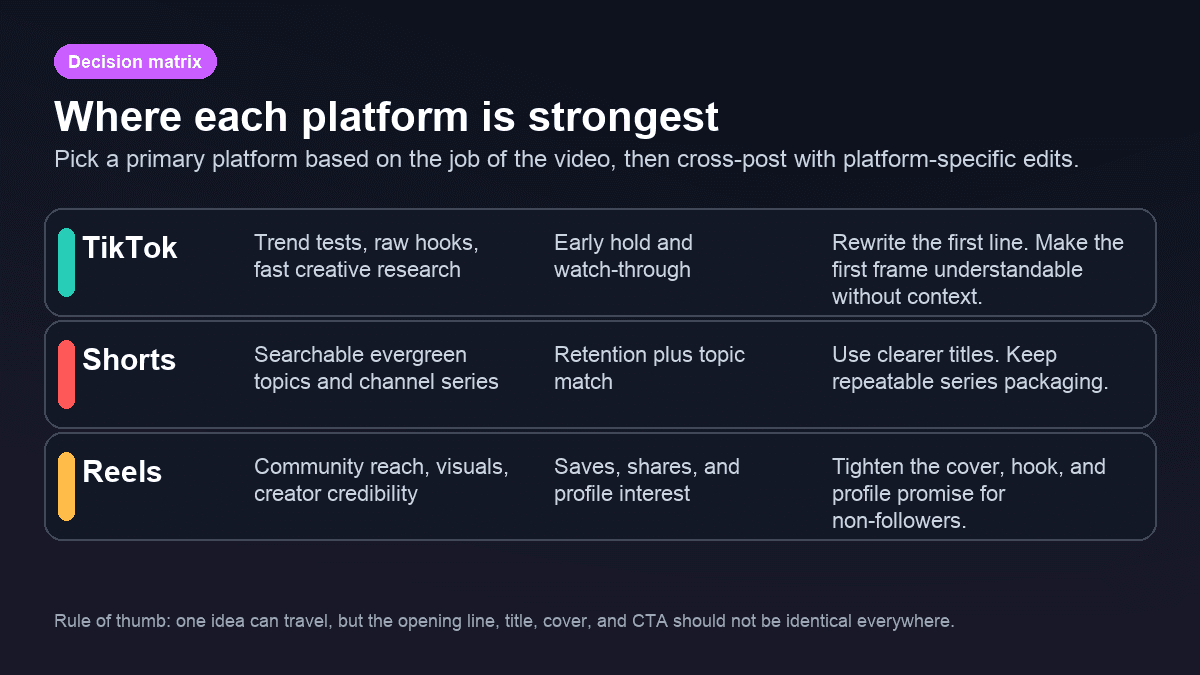
The safest master file is still a vertical 9:16 video. That gives you a clean base for TikTok, YouTube Shorts, and Reels. The differences show up in length, discovery expectations, and how much context viewers bring with them.
YouTube's current Shorts help page says eligible square or vertical uploads can be categorized as Shorts up to three minutes long when uploaded on or after October 15, 2024. Source: YouTube Help: Understand three-minute YouTube Shorts.
TikTok's public auction in-feed ad specification is not a complete organic posting rulebook, but it is useful export guidance. It recommends 9:16 vertical for non-Spark in-feed ads and lists platform constraints such as supported video formats and file size guidance. Source: TikTok Business Help: auction in-feed ads.
Instagram's Help Center says Reels over three minutes will not be recommended to new audiences, which makes under three minutes a practical discovery guardrail for most creators. Source: Instagram Help Center: record and edit a reel.
The practical takeaway is simple:
| Platform | Default length for first tests | What to watch |
|---|---|---|
| TikTok | 20-45 seconds | Does the first second make the premise obvious? |
| YouTube Shorts | 30-60 seconds | Does the title and topic fit a repeatable channel series? |
| Instagram Reels | 15-45 seconds | Would someone save, send, or understand the video from the cover? |
Longer videos can work, especially for stories, tutorials, and commentary. But length is a strategy decision. Do not use three minutes just because the format allows it.
How Recommendation Signals Change the Edit
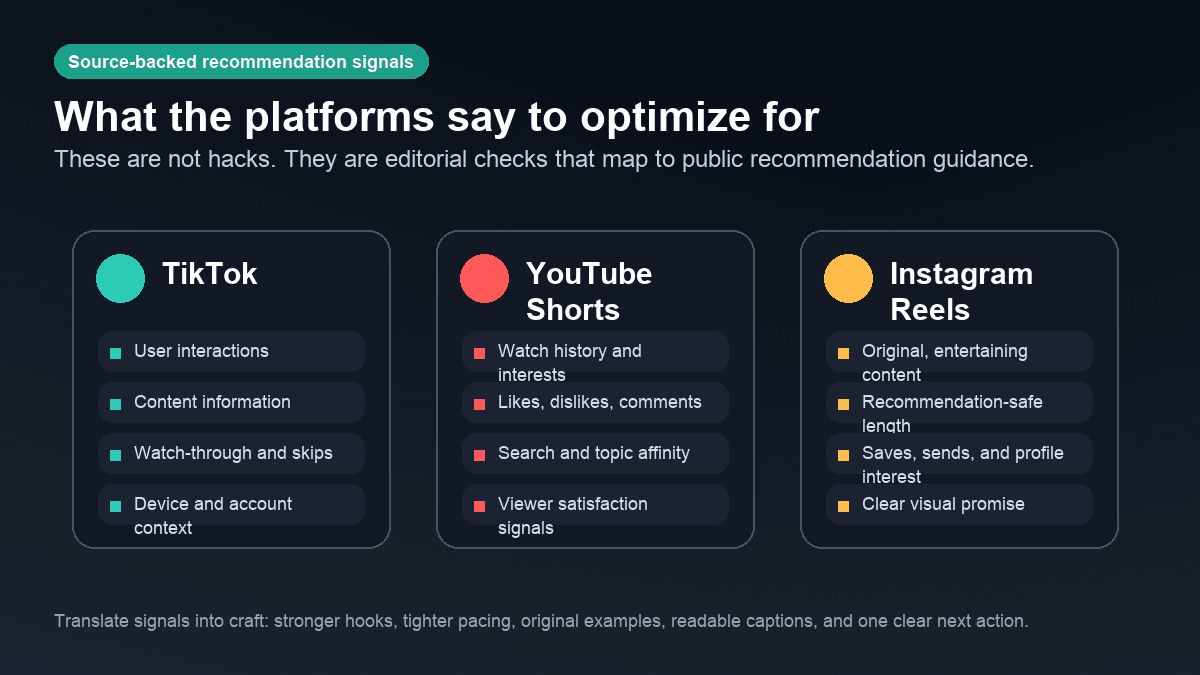
The platforms do not publish a simple ranking formula. They do publish enough guidance to shape your editing checklist.
TikTok's recommendation documentation says For You recommendations use factors such as user interactions, video information, and device/account settings. It also mentions actions such as likes, shares, comments, watching in full, and skipping. Source: TikTok Help: how TikTok recommends content.
YouTube's recommendation system guidance emphasizes personalization from viewer behavior and satisfaction signals rather than a single upload trick. For Shorts creators, that means packaging a topic so the right viewer recognizes it quickly, then delivering enough value that they keep watching. Source: YouTube Help: YouTube's recommendation system.
Instagram says different parts of the app use different ranking systems, and its Reels guidance has historically emphasized entertainment, originality, and actions that show interest. Source: Instagram: ranking explained.
Turn those signals into craft decisions:
- TikTok: rewrite the opening until the video makes sense without setup.
- YouTube Shorts: make the title and topic specific enough to fit a channel promise.
- Reels: make the cover, first frame, and visual style feel credible on your profile.
- All three: keep captions readable, use original examples, and make one clear promise per video.
TikTok: Best for Hook Testing and Fast Creative Research
TikTok is usually the best first stop when you are still finding the angle. It is useful for testing hooks, formats, pacing, and creator language before you lock into a long series.
A TikTok-first faceless video should start with motion, conflict, or a clear claim. Avoid slow context. If the first sentence could be removed without changing the video, remove it.
Good TikTok openings:
- "This is why your AI videos look generic."
- "I tested the lazy prompt everyone keeps copying."
- "Most faceless channels skip the part that actually matters."
- "Here is the 10-second version before we get into the example."
TikTok also has useful research inputs. Its Top Ads documentation says the dashboard can be filtered by region, industry, campaign objective, and other fields, and that individual ads include second-by-second performance graphs. Source: TikTok Business Help: Top Ads Dashboard. TikTok's Keyword Insights documentation says the tool highlights top keywords and phrases from ads and can be filtered by region, industry, and more. Source: TikTok Ads Manager Help: Keyword Insights.
Use those tools for pattern research, not copying. Pull the structure, not the script.
YouTube Shorts: Best for Evergreen Series
YouTube Shorts is a strong fit when your video can become part of a recognizable channel system. That might be AI tool explainers, history stories, productivity mistakes, language learning, niche facts, product education, or recurring "one problem, one fix" content.
Shorts should still hook quickly, but the title matters more than many TikTok creators expect. The viewer may discover the Short from the Shorts feed, a channel page, search, browse, or related surfaces. A clearer topic helps YouTube understand who might care, and it helps viewers recognize whether the Short belongs in their interests.
Strong Shorts packaging:
| Weak | Stronger |
|---|---|
| "AI video tips" | "3 prompt mistakes that make AI Shorts look generic" |
| "Faceless channel idea" | "A faceless Shorts niche you can batch every Monday" |
| "TikTok vs Reels" | "Where to post your first 30 AI short videos" |
If you are building a no-camera YouTube channel, read faceless YouTube channel ideas and best niches for faceless videos before you choose a posting schedule. If the script is the bottleneck, use YouTube Shorts script templates to keep the format repeatable.
One warning: do not scale recycled clips. YouTube's Shorts monetization policies say non-original Shorts, including unedited clips from others or compilations without meaningful original content added, may be ineligible for Shorts ad revenue sharing. Source: YouTube Help: Shorts monetization policies.
Instagram Reels: Best for Profile Trust and Saveable Ideas
Reels is often the best platform when the video supports a broader profile. A creator, consultant, SaaS brand, agency, course creator, or niche community can use Reels to turn short videos into profile visits, saves, shares, and conversation.
A Reels-first edit should answer two questions fast:
- Would a non-follower understand why this video is relevant?
- Would this video make the profile look more useful, credible, or worth following?
That means the cover frame matters. A generic AI visual might work on a fast feed, but it can weaken the profile grid. Use a clean first frame, a sharp title, and a visual style that feels consistent across posts.
Reels also favors saveable formats:
- Mini frameworks.
- Mistake and fix breakdowns.
- Before and after examples.
- Prompt templates.
- Checklists.
- Short case studies.
- "Do this instead" edits.
If you already create faceless TikToks or Shorts, do not treat Reels as an afterthought. Adapt the cover, trim the intro, and make the CTA fit Instagram behavior. "Save this for your next batch" usually fits Reels better than a hard subscribe-style CTA.

The SwipeStory Cross-Platform Workflow
The strongest AI workflow is not "generate three random videos." It is one editorial idea turned into three platform-aware versions.
Use this process:
- Write one core promise.
- Draft three hooks: TikTok, Shorts, and Reels.
- Generate the master video in SwipeStory with voiceover, visuals, captions, music, and pacing.
- Review the video for accuracy, originality, caption readability, and AI disclosure needs.
- Adapt the title, cover, first sentence, and CTA by platform.
- Schedule the posts and review performance by platform.
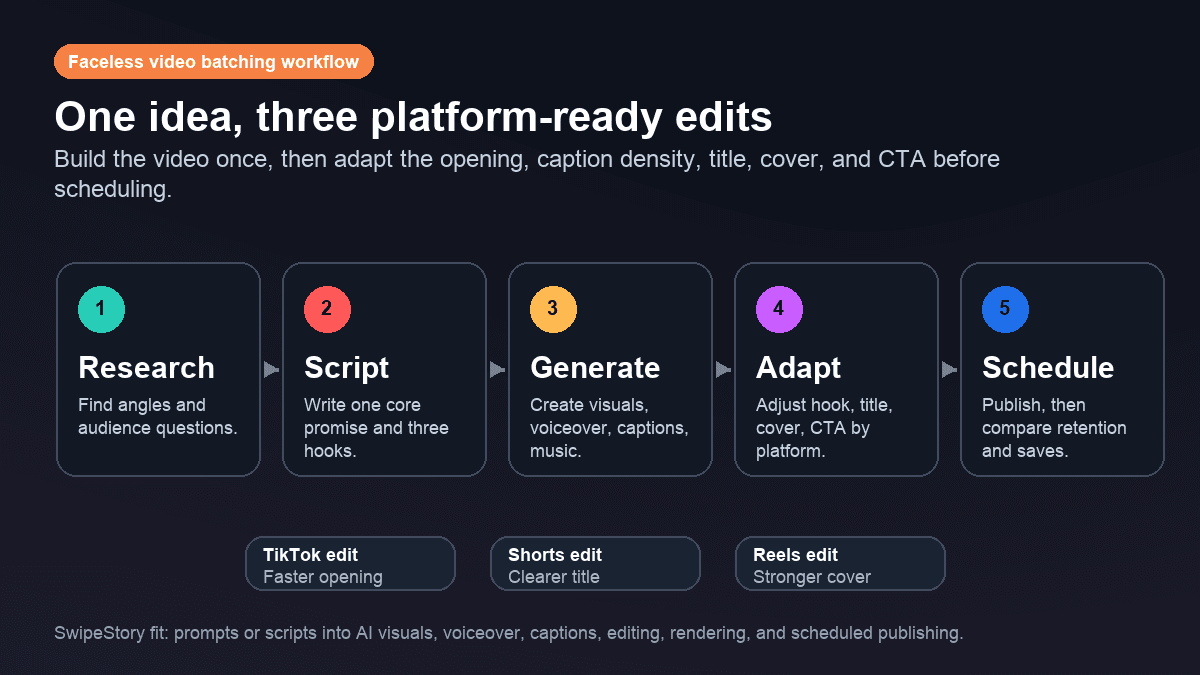
Here is what that looks like with one idea:
| Core idea | TikTok edit | Shorts edit | Reels edit |
|---|---|---|---|
| "AI videos look generic when the prompt lacks a visual beat." | Start with the failed result and say, "This is why it looks generic." | Title it "The prompt mistake that ruins AI Shorts" and explain the repeatable fix. | Use a clean cover: "Fix generic AI videos" and make the post saveable. |
That is where SwipeStory fits naturally. You can start from a prompt or paste a script, then generate a vertical video with AI visuals, voiceover, captions, background music, editing, rendering, and scheduled publishing. The editor still matters. The goal is to shorten the production loop so you have more time for judgment.
A 30-Day Posting Plan
If you are starting from zero, do not try to master all three platforms at once. Use a staged plan.
| Week | Focus | Output |
|---|---|---|
| 1 | Pick one series format | 3 videos posted to your primary platform |
| 2 | Cross-post lightly | 3 master videos adapted to all three platforms |
| 3 | Compare signals | Keep the winning hook pattern and retire weak formats |
| 4 | Batch and schedule | 6-10 platform-adapted videos queued in advance |
Review each platform separately. A TikTok spike does not prove the same cut will work on Shorts. A Reels save rate does not prove the Short title was clear. A Shorts video with steady views over time may be more valuable than a fast TikTok spike if your goal is an evergreen channel.
Use one scorecard:
| Question | Why it matters |
|---|---|
| Did the first two seconds make the promise obvious? | A vague opening fails everywhere. |
| Did the strongest platform match the original goal? | Platform fit beats vanity posting. |
| Did comments reveal the next video idea? | Series depth matters more than one-off output. |
| Did quality drop when you cross-posted? | Adaptation should improve the master, not dilute it. |
Common Mistakes
The biggest mistake is posting the exact same file everywhere and calling it distribution. Cross-posting is useful, but lazy cross-posting creates weak signals.
Avoid these habits:
- Using the same first line on all three platforms.
- Leaving TikTok-style captions too low for other UI layouts.
- Treating Reels covers as optional.
- Using vague YouTube Shorts titles.
- Posting AI-generated claims without checking sources.
- Scaling recycled footage instead of original scripts or commentary.
- Measuring every platform by the same metric.
Also watch the rights and disclosure layer. TikTok has AI-generated content labeling guidance, YouTube has originality rules for monetization, and Instagram has recommendation standards. Faceless video still needs original framing, accurate claims, and a clear reason to exist.
Final Recommendation
For most SwipeStory users, the best order is:
- Pick one primary platform based on your business goal.
- Build a repeatable faceless format.
- Generate and review one strong master video.
- Adapt it into TikTok, Shorts, and Reels versions.
- Schedule the versions, then compare performance by platform.
Use TikTok when you need fast creative feedback. Use YouTube Shorts when the topic can become a searchable channel series. Use Instagram Reels when the video supports profile trust, saves, shares, and community. Use all three once your workflow is stable enough to adapt each edit with intent.
Ready to test that workflow? Start with SwipeStory's tools hub, or choose the platform-specific generator that matches your first series: TikTok, YouTube Shorts, or Instagram Reels.
Frequently Asked Questions
Should I post the same short video to TikTok, Shorts, and Reels?
Yes, but adapt it first. Keep the core idea, then change the hook, title, cover, caption density, and CTA so the video fits each platform's viewing context.
Which platform is best for faceless AI videos?
YouTube Shorts is often strongest for evergreen faceless channels, TikTok is strongest for fast hook testing, and Reels is strongest when the content supports a credible profile or community. The best choice depends on whether you want testing speed, channel depth, or profile trust.
How long should short videos be in 2026?
Start with 20-60 seconds unless the idea needs more time. YouTube Shorts can support eligible videos up to three minutes, and Instagram recommends keeping Reels under three minutes for recommendation to new audiences. Shorter first tests are easier to review and improve.
Can AI help with cross-posting?
Yes. AI is most useful when it handles the repeatable production work: scripts, visuals, voiceovers, captions, music, rendering, and scheduling. Human review still matters for facts, originality, disclosure, and platform-specific packaging.
Sources
- YouTube Help: Understand three-minute YouTube Shorts
- YouTube Help: YouTube's recommendation system
- YouTube Help: Shorts monetization policies
- TikTok Help: How TikTok recommends content
- TikTok Business Help: Top Ads Dashboard
- TikTok Ads Manager Help: Keyword Insights
- TikTok Business Help: Auction in-feed ads
- Instagram Help Center: Record and edit a reel
- Instagram: Ranking explained
