AI UGC Ads Video Generator Guide

Stella writes SwipeStory guides about AI faceless video creation, short-form video strategy, creator tools, and automated publishing workflows.
An AI UGC ads video generator is useful when you need more short-form ad variations than your team can film, edit, and schedule manually. The best choice depends on the ad job: use SwipeStory for script-to-video and faceless product stories, use avatar tools for talking-head reads, and use real creators when trust depends on actual product handling. Do not scale synthetic testimonials without disclosure and claim review.
Updated June 1, 2026. We checked public platform, policy, and product pages from TikTok, YouTube, Meta, the FTC, Creatify, HeyGen, and SwipeStory before writing this guide. Product features and ad rules can change, so treat the linked sources as the final reference before launching paid campaigns.
In this guide, "AI UGC" means UGC-style ad production that borrows the pacing, direct address, and mobile-native structure of creator videos. It does not mean fabricating a real customer's experience. That distinction matters for trust and compliance. A useful AI workflow should help you draft, edit, caption, localize, and schedule ad variations while keeping the product claims, disclosures, and creator framing honest.
Quick Answer: What Should an AI UGC Ads Video Generator Do?
The generator should turn a product brief, script, or URL into a native short-form ad that feels like it belongs in TikTok, YouTube Shorts, or Instagram Reels. That does not mean "make fake user-generated content." It means the production system should help you create mobile-first creative with a clear hook, believable proof, readable captions, platform-safe framing, and a review step before publishing.
For SwipeStory users, the strongest workflow is:
| Step | What to check |
|---|---|
| Brief | One audience, one product problem, one offer. |
| Hook | A first line that creates tension, curiosity, or a concrete payoff. |
| Script | Short beats that can be narrated cleanly in 20-45 seconds. |
| Visuals | Product context, faceless scenes, or demo-style shots that support the claim. |
| Voiceover | A tone that matches the buyer, not just the trend. |
| Captions | Large, high-contrast lines that avoid platform UI. |
| Export | 9:16 vertical video with safe audio and no broken text crops. |
| Review | AI disclosure, endorsement rules, claim accuracy, and landing page consistency. |
If you already have a script, start with SwipeStory's AI TikTok video generator or AI Reel generator. If you need a broader cross-platform workflow, use the AI YouTube Shorts generator and the faceless AI video generator for no-camera concepts.
Platform Specs That Matter for AI UGC Ads
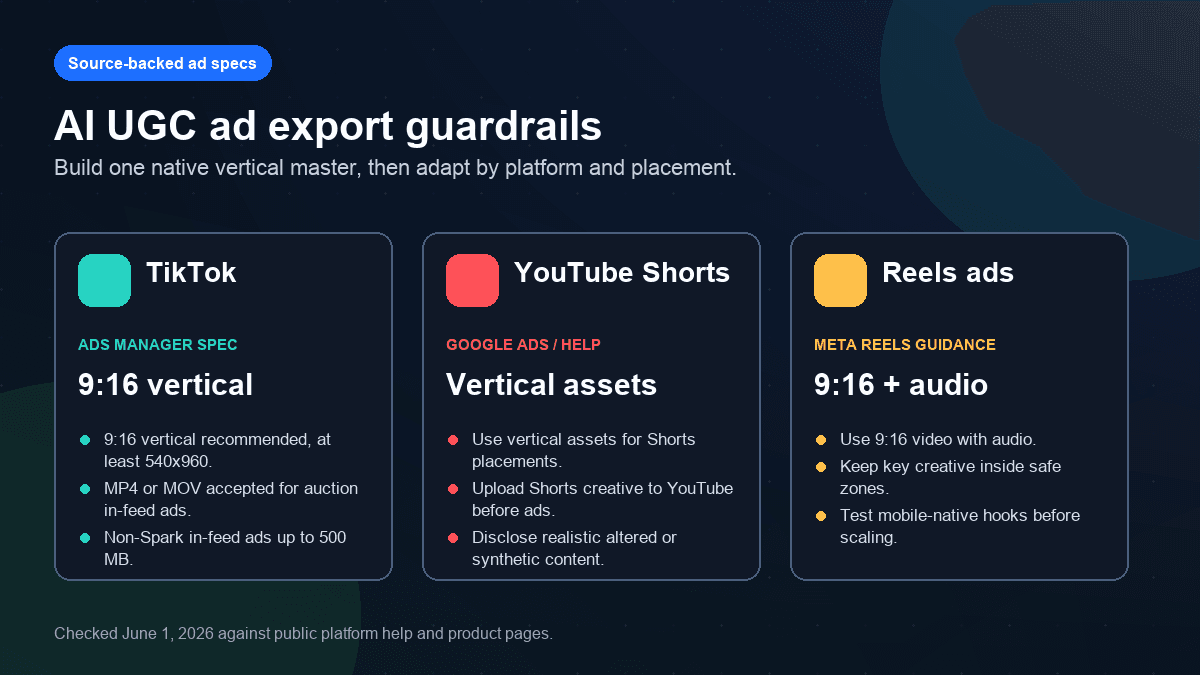
Most AI UGC ad tools can create something that looks vertical. Fewer tools make it easy to review the export for the placement where the ad will run. Start with a 9:16 master because it gives you the cleanest base for TikTok, Reels, and Shorts-style placements.
TikTok's current auction in-feed ad help page lists vertical 9:16 as the recommended non-Spark ad dimension, with a minimum of 540x960 pixels. It also lists common file formats such as MP4 and MOV and a 500 MB limit for non-Spark in-feed video files. Source: TikTok Auction In-Feed Ads.
YouTube's GenAI disclosure help now includes an "AI use" setting in YouTube Studio for content that is AI-generated or meaningfully AI-altered. That matters for AI UGC ad workflows because Shorts-style ad creatives often reuse the same vertical master in organic and paid contexts. Source: YouTube Help: disclosing use of GenAI content.
Meta's business help page for Stories and Reels safe zones warns advertisers about overlays and safe areas in those placements. That is the practical reminder: even if the export is 9:16, low captions, tiny CTAs, or edge-heavy product shots can still get covered by interface elements. Source: Meta Business Help: safe zones for ads in Stories and Reels.
Use these as working defaults:
| Setting | Practical default |
|---|---|
| Canvas | 9:16 vertical |
| Resolution | 1080x1920 when possible |
| Length | 15-45 seconds for first cold-audience tests |
| First frame | Product, problem, or proof visible without sound |
| Captions | Short lines, high contrast, away from UI-heavy edges |
| Audio | Voiceover first, music second |
| Review | AI labels, endorsement risk, product claims, and landing page consistency |
Longer ads can work, but length is not the first optimization. A weak claim in a three-minute ad is still a weak claim. Generate short variations first, then expand the idea only when the hook and proof are working.
The Creative Loop: Brief, Hook, Proof, Trust, CTA
AI UGC ads fail when the generator is asked to invent everything. A better workflow gives the model a tight production brief, then asks for controlled variants.
TikTok's Symphony Creative Studio positions itself as an AI-powered creative tool for producing TikTok-style ads from basic details or assets. Creatify's TikTok App Center listing says it can create UGC-style ads from a product link or description and mentions more than 220 avatars. HeyGen's UGC page describes AI avatar videos for ad-ready marketing creative. Those product pages show the category direction: more teams want fast ad variants from fewer production inputs.
That speed helps only if the underlying ad logic is sound.
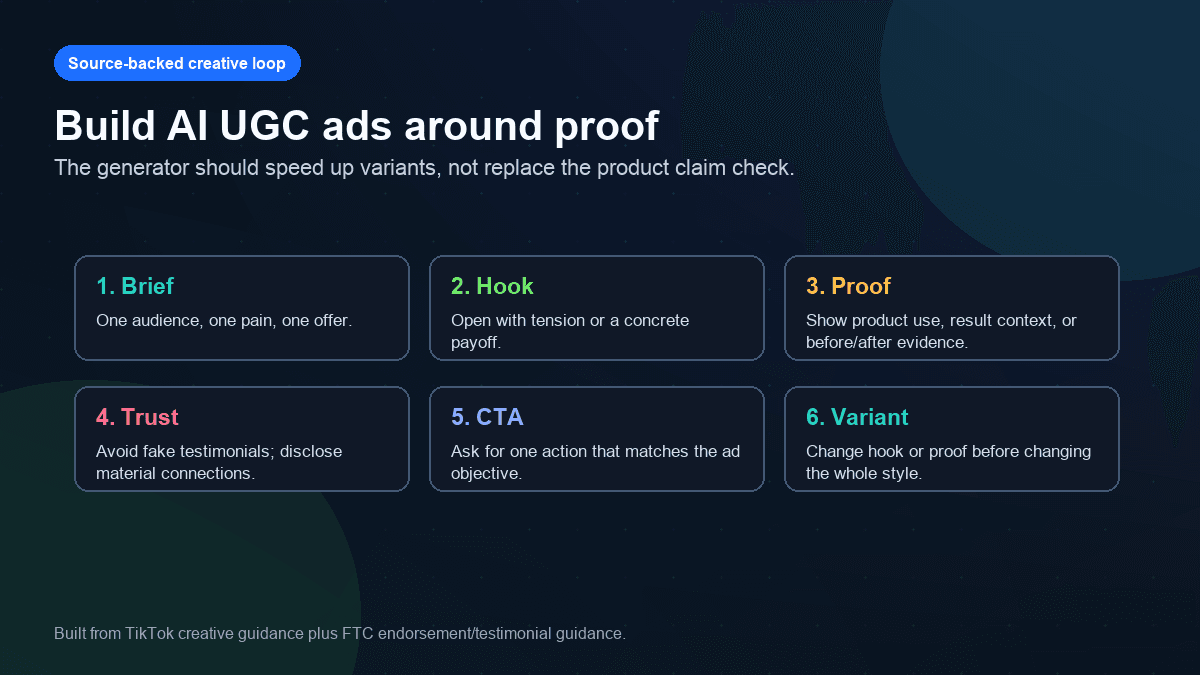
Use this ad brief before opening any AI UGC tool:
Create a 30-second short-form ad.
Audience: [specific buyer].
Product: [product and main use case].
Problem: [one pain point the buyer recognizes].
Offer: [trial, discount, signup, demo, or product page].
Hook: [first line that creates tension or a clear payoff].
Proof: [real product detail, demo context, testimonial source, or before/after evidence].
Visual style: [faceless product story, avatar read, demo montage, founder voiceover].
Caption rules: short lines, high contrast, no paragraphs.
CTA: [one action].
Compliance notes: do not invent customer quotes, fake endorsements, or unsupported results.
Here is a stronger version for a faceless SaaS ad:
Create a 35-second faceless UGC-style ad for creators who need short-form videos but do not want to edit manually.
Opening line: "Your short video idea is not the bottleneck. Editing the same format every week is."
Beat 1: Show a messy script and stalled content calendar.
Beat 2: Show the script becoming voiceover, visuals, captions, and music.
Beat 3: Show three platform versions queued for TikTok, Shorts, and Reels.
Proof: mention the workflow only; do not invent customer results.
CTA: "Turn one script into your next short video."
Tone: direct, helpful, creator-to-creator.
The prompt is intentionally specific. It gives the generator something to film, narrate, and caption. It also blocks the common failure mode where AI invents customer quotes or claims that your landing page cannot support.
Which AI UGC Generator Type Fits Your Ad?
There is no single best AI UGC ads video generator for every campaign. The right tool depends on what you want the viewer to believe.
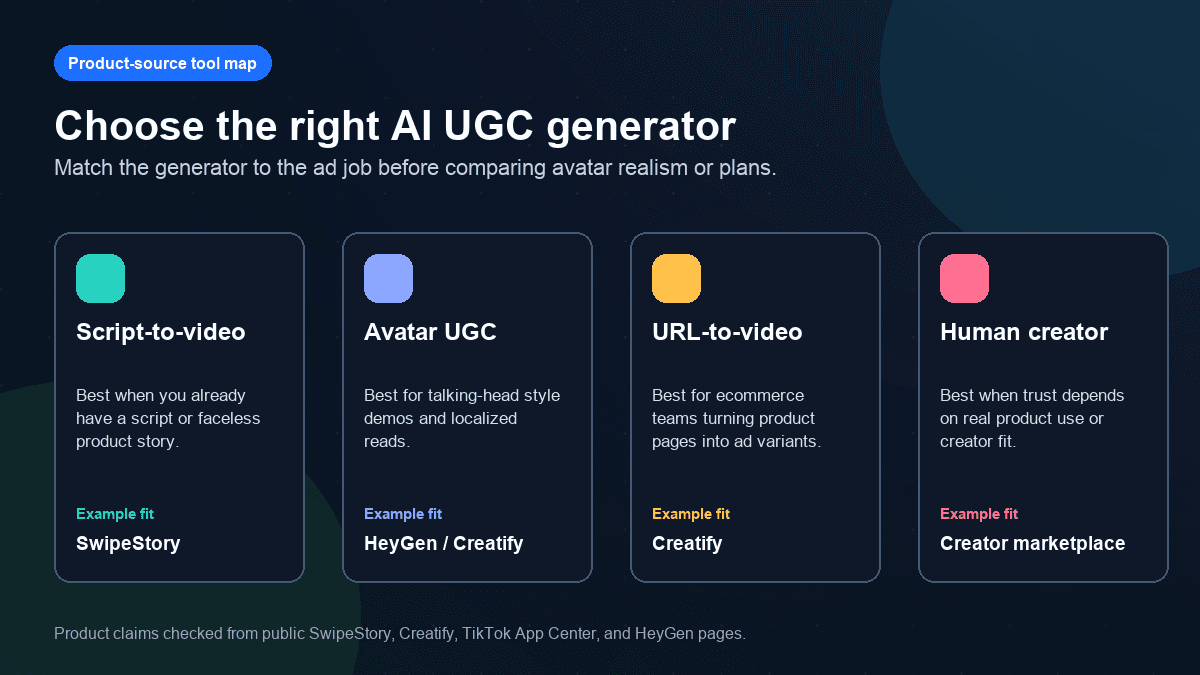
Use a script-to-video tool when the story is faceless, educational, or product-explainer driven. That is where SwipeStory fits. You can turn prompts or scripts into vertical videos with AI-generated visuals, voiceovers, captions, background music, editing, rendering, and scheduled publishing for TikTok, YouTube Shorts, and Instagram Reels.
Use an avatar UGC tool when the ad needs a talking-head read but does not require a real customer's lived experience. Tools like HeyGen and Creatify are built around avatar-led video production, and they can be useful for localization, fast script tests, and ecommerce variations.
Use URL-to-video when the main bottleneck is turning product pages into many ad drafts. This can be efficient for ecommerce catalogs, but it still needs human review because product pages are often written for buyers who are already interested. Ads need sharper hooks.
Use a real creator when trust depends on actual product use. If the ad promise is "I tried this," "this changed my routine," or "here is what happened after 30 days," synthetic UGC is the wrong default unless the creative is clearly framed, disclosed, and backed by real evidence.
The SwipeStory Workflow for Faceless UGC-Style Ads
SwipeStory is a better fit for faceless UGC-style ads than for pretending an AI actor is a real customer. Use it when the ad can be built from a clear product story, script, voiceover, captions, and platform schedule.
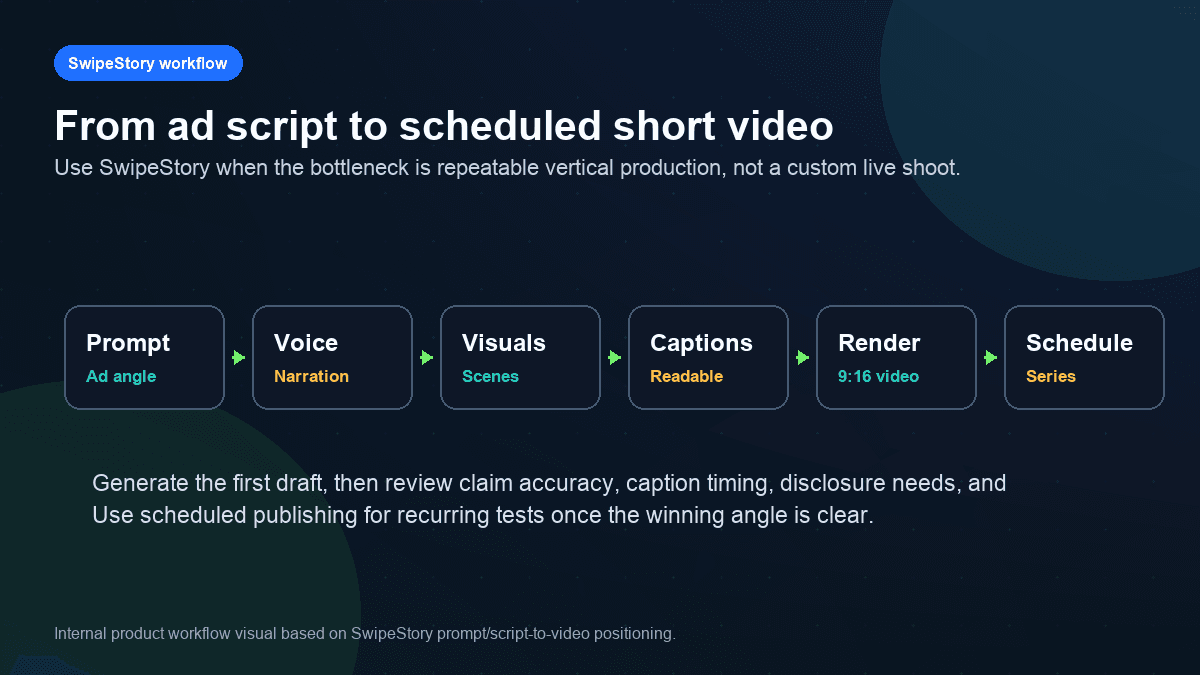
A practical SwipeStory ad workflow looks like this:
- Write the ad script in plain language.
- Pick one platform as the first test, usually TikTok or Reels for paid social.
- Generate a vertical draft with voiceover, visuals, captions, and background music.
- Review the first two seconds for clarity without sound.
- Check captions for safe zones and readability.
- Remove unsupported claims, fake customer language, and exaggerated outcomes.
- Create two more variants by changing the hook or proof, not the entire ad.
- Schedule the versions and compare performance by placement.
That last point matters. A generator should make creative testing cheaper, but it should not remove judgment. If the first ad is confusing, creating 20 versions only multiplies the confusion.
For more inputs, pair this workflow with TikTok hook examples, AI video prompts for Shorts, and the AI video script generator guide. If your ad is part of a broader organic channel, the AI shorts generator guide gives you a cleaner publishing system.
Disclosure and Claim Review for AI UGC Ads
The sensitive part of AI UGC ads is not the editing. It is the implication. Viewers may interpret a first-person script, avatar, or testimonial-style video as a real person's experience. That can create policy, trust, and regulatory risk.
TikTok says creators are required to label AI-generated content that contains realistic images, audio, or video. Its page also describes creator labels, auto labels, Content Credentials, and categories of prohibited AI-generated content. Source: TikTok Help: AI-generated content.
YouTube's disclosure guidance says creators should disclose content that is AI-generated or meaningfully AI-altered, using the AI use setting in YouTube Studio. Source: YouTube Help: disclosing use of GenAI content.
The FTC's endorsement guidance is the commercial layer. It focuses on endorsements, testimonials, material connections, and whether consumers are likely to believe the message reflects someone other than the advertiser. Source: FTC Endorsement Guides.
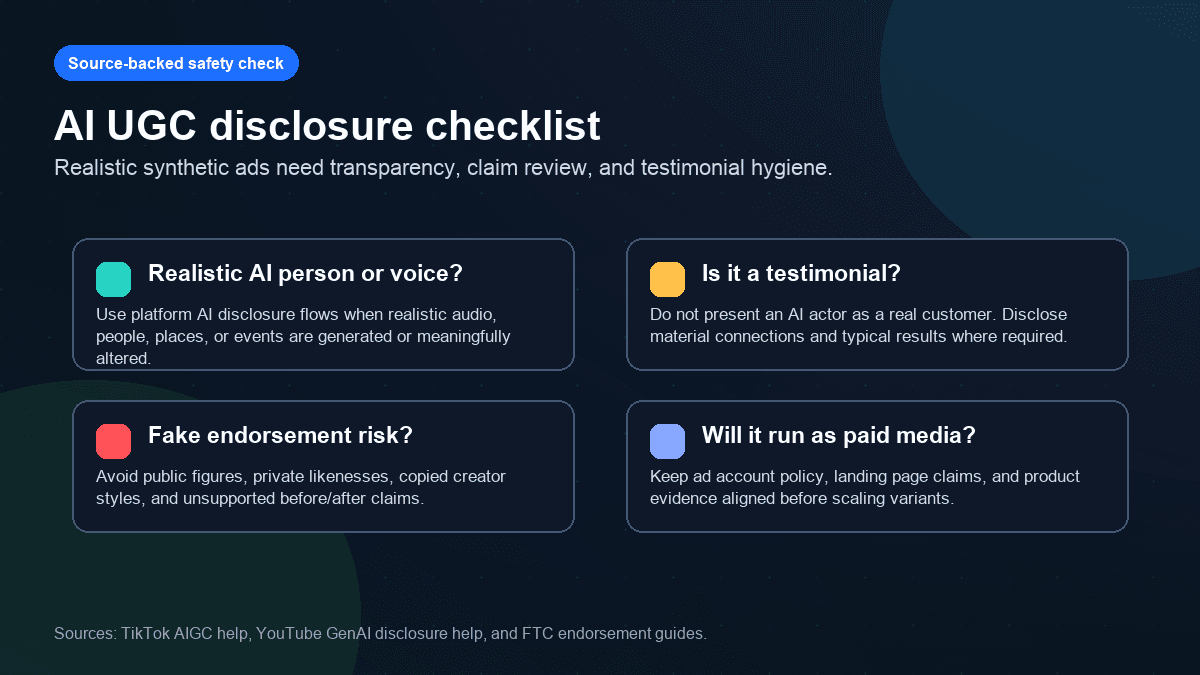
Use this review checklist before publishing:
| Question | Why it matters |
|---|---|
| Does the ad use a realistic synthetic person, voice, product demo, or event? | Platform AI disclosure rules may apply. |
| Does the script sound like a real customer testimonial? | Do not imply a real customer experience if there was none. |
| Does the ad mention results, savings, health, income, or performance? | The claim needs evidence and landing page consistency. |
| Is an AI actor presented as a creator, employee, customer, or expert? | Clarify the role and avoid fake endorsements. |
| Would the same message be acceptable if a human influencer said it? | If not, the AI version is not safer. |
The safest wording is often more specific and less theatrical. "Here is a faster way to draft short-form ad variants" is safer than "this tool doubled my sales overnight" unless that exact claim is real, substantiated, and disclosed appropriately.
Mistakes to Avoid With AI UGC Video Ads
The biggest mistake is treating UGC as an aesthetic instead of a trust format. A shaky phone frame, avatar face, or creator-style caption does not make an ad credible. Credibility comes from product truth, useful context, and honest framing.
Avoid these habits:
- Inventing customer quotes or fake creator reactions.
- Asking AI to generate "viral UGC" without a real offer, audience, or proof point.
- Using the same script on TikTok, Shorts, and Reels without adapting captions and CTAs.
- Placing captions where platform UI will cover them.
- Scaling avatar reads before testing whether the hook is understandable.
- Turning product-page copy into an ad without rewriting the first line.
- Forgetting AI disclosure and endorsement review because the ad is "only a test."
Also avoid over-polishing. Some AI-generated ads look expensive but say very little. A direct product problem, simple visual proof, and clear CTA usually beat a cinematic montage with no buyer tension.
Final Recommendation
Choose the AI UGC ads video generator based on the trust job:
| Use case | Best fit |
|---|---|
| Faceless product story from a script | SwipeStory |
| Talking-head avatar read | Avatar UGC tool |
| Ecommerce product page variants | URL-to-video tool |
| Real customer experience | Human creator or customer footage |
| Cross-platform ad series | SwipeStory plus platform-specific review |
If your campaign starts from a script or product story, use SwipeStory to create the first vertical draft, then adapt the same idea for TikTok, Shorts, and Reels. Start with SwipeStory's tools hub, or choose the generator that matches your first test: AI TikTok video generator, AI YouTube Shorts generator, or AI Reel generator. For budget planning, check SwipeStory pricing before building a recurring ad series.
Frequently Asked Questions
Can AI UGC ads replace real creators?
Sometimes, but not always. AI UGC tools are useful for faceless explainers, avatar reads, localization, and early creative tests. Real creators are still better when trust depends on actual product handling, personal experience, or community fit.
What is the best format for AI UGC video ads?
Use a 9:16 vertical master as your default. Keep the first line clear, place captions away from UI-heavy edges, and export at 1080x1920 when possible.
Can I use AI avatars for testimonials?
Be careful. Do not present an AI avatar as a real customer or imply a personal experience that did not happen. Review platform AI disclosure rules and FTC endorsement guidance before running testimonial-style ads.
Should I make one ad or many variants?
Make one strong ad first, then create controlled variants. Change the hook, proof point, or CTA while keeping the same product claim. Randomly generating many videos usually creates noise, not learning.
