Drag-and-Drop Video Editing: A Beginner's 2026 Guide

Stella writes SwipeStory guides about AI faceless video creation, short-form video strategy, creator tools, and automated publishing workflows.
Drag-and-drop video editing is defined as a visual interface method that lets creators arrange clips, images, and audio on a timeline using simple mouse movements, with no coding or technical training required. This approach has replaced complex command-line workflows for millions of creators, compressing what once took hours into a process that takes minutes. The shift is not a trend. It is the new standard for content production on platforms like TikTok, Instagram, and YouTube. Swipestory builds its entire video creation workflow around this principle, combining drag-and-drop simplicity with AI automation so creators at any skill level can publish high-quality videos fast.
What is drag-and-drop video editing?
Drag-and-drop video editing is a simplified interface design that lets creators arrange multimedia assets visually without professional technical skills, drastically reducing editing time from hours or weeks to minutes. The industry term for this approach is "non-linear editing," or NLE. Traditional NLE software like professional desktop applications requires creators to learn keyboard shortcuts, understand codec settings, and navigate dense menus. Drag-and-drop editors strip all of that away and replace it with a visual canvas.
The core mechanic is exactly what the name suggests. You select a media file, hold the mouse button, move the file to a position on the timeline, and release. The editor places the clip where you dropped it. From there, you trim the edges, split the clip, or reorder it by dragging it to a new position. Editing replaces command-line syntax with intuitive mouse-driven movements for tasks like clip trimming, splitting, and reordering.

This matters because the barrier to entry for video production has historically been technical skill, not creative ability. Drag-and-drop editing separates those two things. A creator with a strong story idea can now execute it without spending weeks learning software.
How does drag-and-drop video editing work?
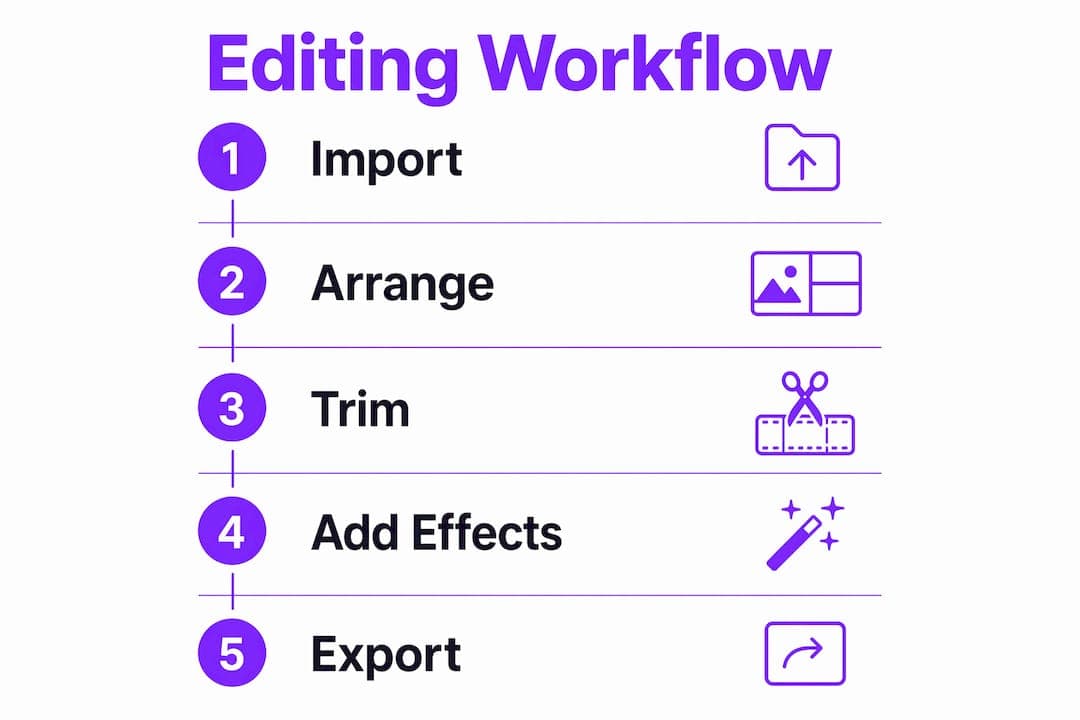
The workflow in a drag-and-drop editor follows a predictable structure. Understanding each step helps you move faster and avoid common mistakes.
- Media import: You upload or connect your video clips, images, audio files, and graphics to a media library panel. Most editors accept common formats like MP4, MOV, MP3, and PNG without conversion.
- Timeline arrangement: You drag clips from the media library onto a horizontal timeline. The timeline represents time from left to right. Clips placed earlier on the timeline play first.
- Trimming and splitting: You drag the edge of a clip inward to shorten it. You split a clip by placing the playhead at a specific moment and clicking a split button, creating two separate segments.
- Reordering: You drag clips to new positions on the timeline to change the sequence of your video.
- Audio and text layers: You drag audio tracks onto separate rows below the video track. Text, captions, and graphics sit on their own layers above the video, letting you control what appears on screen at any moment.
- Transitions and effects: You drag preset transitions between clips to control how one scene moves into the next. Effects panels work the same way.
AI tools integrated in drag-and-drop editors assist with natural language commands for trimming, transitions, and duplications, automating tedious tasks while keeping the interface accessible. This means you can type "remove silence" or "add a fade between clips" and the editor executes it. That combination of visual editing and AI assistance is what makes modern drag-and-drop software genuinely fast.
Pro Tip: Before you touch the timeline, watch your raw footage once through and mark your best takes. Editors who pre-select clips spend far less time hunting through footage during the edit.
What advantages does drag-and-drop editing offer over traditional methods?
The biggest advantage is the elimination of tool fatigue. Complex interfaces cause tool fatigue in new creators, and drag-and-drop editors effectively eliminate this hurdle, increasing the frequency of content publication. When a creator is not fighting the software, they focus on the story.
Here are the core advantages, ranked by impact:
- Faster workflow. Streamlined drag-and-drop workflows enable faster post-production than traditional software. A task that required ten keyboard shortcuts now takes one mouse movement.
- Zero installation required. Browser-based editors run entirely in a web browser. You open a tab, log in, and start editing. No download, no system compatibility check, no storage consumed on your hard drive.
- Lower learning curve. Traditional professional editors require weeks of tutorials before a beginner produces anything usable. Most drag-and-drop tools become functional within an hour of first use.
- Accessible cost models. Most drag-and-drop editors operate on SaaS models offering free tiers with limitations and paid plans unlocking AI tools, cloud storage, and professional features. Free tiers let creators test the software before committing money.
- Reduced cognitive load. Visual timelines make the structure of a video immediately obvious. You see the sequence, the layers, and the timing at a glance. Traditional editors often require mental translation between settings and outcomes.
Drag-and-drop interfaces remove barriers caused by jargon-heavy menus, enabling creators to focus on storytelling and produce content more frequently. The tool stops being the obstacle and becomes the vehicle.
Pro Tip: Organize your media into labeled folders before you open the editor. Practitioners who sort assets by scene or topic before editing cut their search time by up to 50% during the actual edit.
What technologies power modern drag-and-drop video editors?
The performance of browser-based drag-and-drop editors has improved dramatically because of two specific technologies: WebGPU and the File System Access API. Browser-based editors use WebGPU and File System Access API to perform all video processing locally, ensuring privacy, instant startup, and no file uploads unlike traditional cloud rendering tools.
WebGPU gives the browser direct access to your device's graphics card. That means video rendering, real-time preview, and effects processing happen on your hardware, not on a remote server. The result is faster previews and shorter export times. The File System Access API lets the browser read and write files directly on your hard drive without uploading them. Your footage never leaves your device.
| Feature | Local processing | Cloud rendering |
|---|---|---|
| Privacy | Files stay on your device | Files upload to external servers |
| Startup speed | Instant, no upload wait | Depends on file size and connection |
| Offline access | Full functionality without internet | Requires active connection |
| Processing power | Uses your device's GPU | Uses provider's server capacity |
| Cost model | Often free or one-time | Typically subscription-based |
Open-source browser video editors now provide advanced features like multi-track timelines, real-time GPU-accelerated preview, keyframe animation, and 4K export with no watermark and no subscription fees. That level of capability was exclusive to expensive desktop software five years ago.
AI integration adds another layer. Editors with built-in AI can analyze footage, suggest cuts, generate captions automatically, and apply color correction without manual input. Swipestory takes this further by automating the entire pipeline, from script generation to voiceover to final render, all within a drag-and-drop environment.
Pro Tip: If privacy matters to you, choose a browser-based editor that explicitly states local processing. Check the privacy policy for any mention of file uploads before you start a project with sensitive footage.
How to use drag-and-drop video editing tools effectively
Effective use of drag-and-drop software comes down to workflow habits, not just feature knowledge. The following practices separate creators who publish consistently from those who get stuck mid-project.
- Sort your media before you open the editor. Create folders labeled by scene, topic, or date. Good asset organization before editing begins reduces time spent hunting for clips and directly speeds up the edit. This single habit has the highest return on time invested.
- Build a rough cut first. Drag all your selected clips onto the timeline in sequence without worrying about timing. Get the structure right before you refine anything. Trying to perfect each clip as you go creates bottlenecks.
- Use templates and presets. Most drag-and-drop editors include pre-built intro sequences, lower thirds, and transition packs. Applying a template takes seconds. Building the same element from scratch takes minutes.
- Layer audio deliberately. Place your primary audio track first, then add background music on a separate layer at a lower volume. Drag the volume handles to fade music in and out around spoken content.
- Use keyboard shortcuts for speed. Even in drag-and-drop editors, shortcuts for play/pause (spacebar), split (S or C depending on the tool), and undo (Ctrl+Z) save significant time. Learn five shortcuts and use them consistently.
- Export a low-resolution draft first. Before your final export, render a quick low-quality preview to catch timing errors, audio sync issues, and missing transitions. Fixing problems at draft stage costs seconds. Fixing them after a full 4K export costs minutes.
- Avoid over-layering. New creators often stack too many effects, text elements, and transitions. A clean edit with two or three intentional effects reads as more professional than a cluttered one with ten.
Swipestory's AI video generator handles several of these steps automatically, including script writing, voiceover, and rendering, which removes the most time-consuming parts of the workflow entirely.
How to choose the best drag-and-drop video editing software in 2026
Choosing the right tool depends on four criteria: ease of use, processing model, export options, and AI capability. Evaluating each one before committing saves you from switching tools mid-project.
| Evaluation criterion | What to look for | Why it matters |
|---|---|---|
| Ease of use | Clean interface, visible timeline, labeled tools | Reduces learning time and editing friction |
| Processing model | Local vs. cloud; offline capability | Affects privacy, speed, and cost |
| Export options | Resolution choices, format variety, watermark policy | Determines where and how you can publish |
| AI features | Auto-captions, smart trim, script generation | Speeds up repetitive tasks significantly |
| Cost model | Free tier availability, subscription pricing | Affects long-term sustainability for creators |
Entry-level browser tools work well for creators who publish short-form content and need fast turnaround. Mid-tier subscription platforms add cloud storage, team collaboration, and more export formats. Enterprise platforms offer custom branding, API access, and advanced analytics, but they come with pricing that does not suit individual creators.
The clearest signal that a tool fits your needs is whether you can complete a full edit, from import to export, without consulting a tutorial. If you need to watch a video to perform a basic task, the interface is not working for you. Try a different tool. The free AI video tools available in 2026 make it practical to test multiple options before choosing one.
AI capability deserves special attention when evaluating options. Tools that generate captions automatically, suggest cuts based on pacing, or write scripts from a topic prompt save hours per week for active creators. That time compounds quickly across a content calendar. Swipestory's approach, which automates the full pipeline with AI while keeping the interface visual and accessible, represents where the best drag-and-drop video software is heading in 2026.
Key Takeaways
Drag-and-drop video editing is the most accessible path to consistent video production because it replaces technical complexity with visual control, and AI integration now handles the tasks that visual interfaces cannot.
| Point | Details |
|---|---|
| Core definition | Drag-and-drop editing lets creators arrange clips visually on a timeline with no technical training required. |
| Speed advantage | Streamlined workflows compress editing time from hours to minutes compared to traditional software. |
| Technology foundation | WebGPU and File System Access API enable local processing, protecting privacy and eliminating upload delays. |
| Workflow habit | Organizing media assets before editing cuts search time significantly and speeds up the entire project. |
| Selection criteria | Evaluate tools on ease of use, processing model, export options, and AI capability before committing. |
Why drag-and-drop editing changed how I think about video creation
I spent years watching talented people give up on video because the software defeated them before they published a single clip. The problem was never creativity. It was always the interface. Professional desktop editors were built for professionals, and they made no apology for that. The learning curve was a filter, not a flaw.
What drag-and-drop editing did was remove that filter. The first time I watched someone with zero editing experience build a coherent short video in under 20 minutes using a browser-based tool, I understood that the technology had genuinely shifted. The barrier between idea and published video had collapsed.
The part that surprises most people is how much creative control you retain. Drag-and-drop does not mean dumbed-down. Multi-track timelines, keyframe animation, and 4K export are all available in tools that a beginner can use on day one. The simplicity is in the interface, not in the output.
What I expect to see more of in 2026 and beyond is deeper AI integration at the asset level. Not just auto-captions, but tools that understand the narrative arc of your footage and suggest structural edits. Swipestory is already moving in that direction, automating the pipeline from script to final render while keeping the creator in control of the story. That combination, AI speed plus human creative judgment, is where the best work will come from.
My honest recommendation: pick one tool, learn it for 30 days, and publish something every week. The skill compounds faster than you expect.
— Jesse
Swipestory makes drag-and-drop video creation faster
Swipestory is built for creators who want to publish more without spending more time editing. The platform's AI video generator takes a topic or script and produces a complete short video, including voiceover, captions, and visuals, in minutes. Over 60,000 short videos have already been generated by creators using the platform.
Swipestory also offers an educational video maker for creators who produce explainer content, tutorials, or training material. Both tools use AI to handle the technical steps so you focus on the message. A free tier is available, and no video editing experience is required to get started.
FAQ
What is drag-and-drop video editing in simple terms?
Drag-and-drop video editing is a method where you move media files onto a visual timeline using your mouse, arranging clips, audio, and graphics without any coding or technical commands. It replaces complex software menus with a point-and-click interface anyone can use.
Do drag-and-drop video editors require installation?
Many modern drag-and-drop editors run entirely in a web browser using local processing technology, requiring no download or installation. You open the tool in a browser tab and start editing immediately.
How does AI improve drag-and-drop video editing?
AI tools inside drag-and-drop editors automate tasks like trimming silence, generating captions, applying transitions, and even writing scripts, reducing the manual steps in a typical editing session. Swipestory automates the full pipeline from script to final render.
Is drag-and-drop editing good enough for professional video output?
Browser-based drag-and-drop editors now support multi-track timelines, real-time GPU-accelerated preview, keyframe animation, and 4K export, making them capable of producing professional-quality results without subscription fees or desktop software.
What is the single most important habit for faster drag-and-drop editing?
Organizing your media assets into labeled folders before opening the editor is the highest-impact habit, cutting the time spent searching for clips during the edit and keeping the workflow moving without interruption.
