
What Is AI Video Automation? A Creator's Guide

Stella writes SwipeStory guides about AI faceless video creation, short-form video strategy, creator tools, and automated publishing workflows.
AI video automation is the end-to-end process that uses artificial intelligence to produce finished, polished videos from a simple topic or prompt input. No camera, no editing timeline, and no production crew required. The technology combines large language models (LLMs) for scripting, text-to-speech (TTS) engines for narration, and visual generation models for imagery, all connected in a single automated pipeline. Understanding what AI video automation is and how it works gives content creators, marketers, and small business owners a real edge in producing consistent, high-quality video content at scale.
What is AI video automation and how does it work as a pipeline?
AI video automation is best understood as a modular assembly line. Each stage of video production is handled by a specialized AI engine, and those engines connect through APIs to pass output from one step to the next. The result is a finished video with minimal human input at the production level.
A professional AI pipeline uses modular tools via API orchestration to automate script generation, text-to-speech, and rendering. That modularity is what separates a scalable production system from a one-off experiment.
Here is how a standard pipeline runs from start to finish:
- Research and topic input. You provide a topic, keyword, or prompt. An LLM with web access pulls current information and structures it into a content brief. This step replaces hours of manual research.
- Script generation. The LLM converts the brief into a narration script, broken into scenes. Each scene includes a spoken line and a visual direction, similar to a storyboard note.
- Voiceover production. A TTS engine converts the script into spoken audio. AI text-to-speech engines like ElevenLabs offer hyper-realistic, emotion-rich voices that match the tone of the content. That quality level was unachievable with synthetic voices just three years ago.
- Visual generation. Image and video synthesis models generate or source visuals for each scene. Motion parameters, depth estimation, and scene transitions are applied automatically.
- Final assembly. Tools like FFmpeg and Remotion synchronize audio, visuals, and transitions into a single rendered file. This step replaces the most time-consuming part of manual editing.
AI video production timelines range from under 10 minutes for platform-optimized short videos to around 72 hours for high-fidelity studio-grade productions. The gap between those two extremes reflects the tradeoff between speed and visual quality.
Pro Tip: Build your pipeline in stages. Get the script and voiceover working reliably before adding visual generation. Debugging one layer at a time saves hours of troubleshooting.
What are the main types of AI video automation methods?
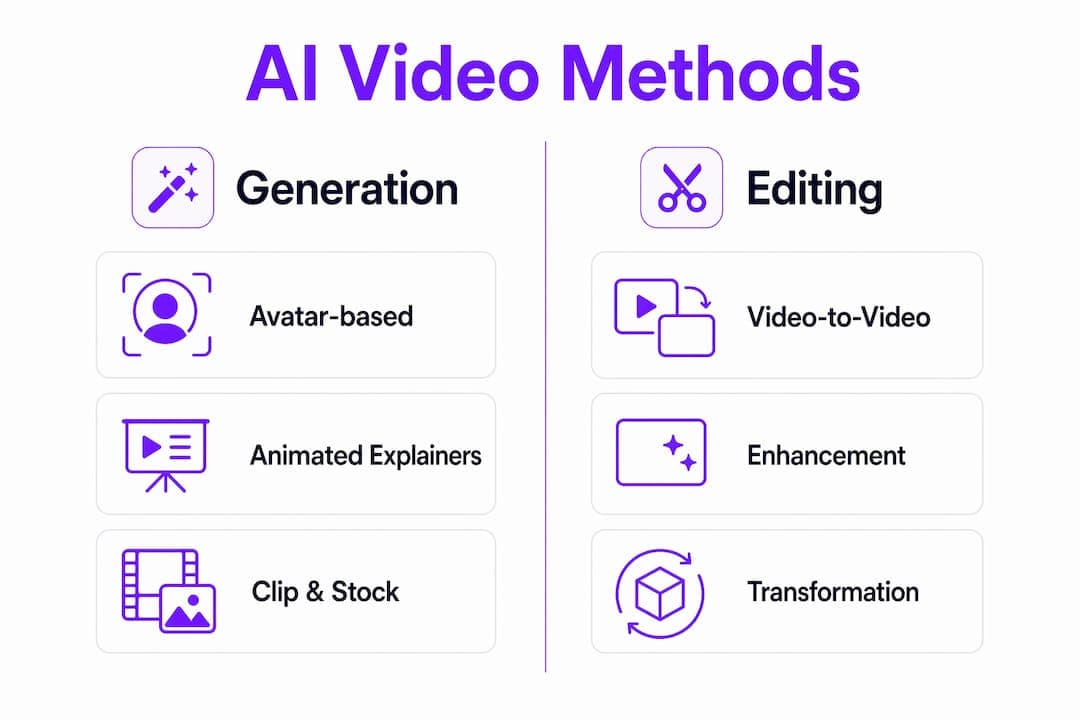
Automated video creation is not a single technique. Four distinct methods exist, and each serves a different use case, audience, and quality level.
Avatar-based video generation
Avatar-based generation places a digital human on screen with lip movements synced to the AI voiceover. The avatar reads the script while the background, clothing, and setting are fully customizable. This method works well for explainer videos, corporate training content, and product walkthroughs where a "presenter" builds viewer trust.
Clip and stock footage automation
This approach assembles licensed stock clips with an AI-generated voiceover and auto-generated captions. The AI selects clips based on keyword matching to each script line. It is the fastest method and works well for news-style content, listicles, and social media posts where visual variety matters more than original imagery.

Animated explainer video generation
Animated explainers use scene planning and original narration to produce motion graphics style videos. The AI writes the script, generates the visuals as illustrations or simple animations, and renders the final output. This method suits educational content, product demos, and brand storytelling.
Video-to-video editing
Video-to-video AI editing transforms existing footage by changing lighting, backgrounds, or apparel, enabling fast creative iterations without full reshoots. Techniques include optical flow conditioning, depth and pose estimation, and diffusion-based inpainting. For marketers running A/B tests on ad creative, this method cuts iteration time from days to hours.
Here is a quick comparison of these four methods by use case:
| Method | Best for | Production speed | Original visuals |
|---|---|---|---|
| Avatar-based | Explainers, training, product demos | Fast | No |
| Clip and stock | Social posts, listicles, news content | Fastest | No |
| Animated explainer | Education, brand storytelling | Moderate | Yes |
| Video-to-video | Ad testing, creative iteration | Fast | Partial |
The right method depends on your content goal, not on which technology sounds most advanced.
What are the benefits of AI video automation for creators and marketers?
The most direct benefit of automated video creation is speed. Video automation reduces production time from several hours to under 30 minutes by automating most stages. That shift changes what is possible for a solo creator or a small marketing team.
Beyond speed, the practical benefits stack up quickly:
- Cost reduction. Automating scripting, voiceover recording, and editing removes the need to hire a videographer, voice actor, or editor for every piece of content.
- Consistency at scale. AI pipelines apply the same formatting, pacing, and style rules to every video. Brand consistency across 10 videos or 100 videos takes the same effort.
- Rapid A/B testing. Video-to-video techniques let marketers generate multiple ad variants from a single source video. Testing five hooks on the same product video takes minutes, not days.
- No filming required. AI video automation tools empower small businesses and creators to produce content consistently across platforms without filming or editing expertise. That removes the single biggest barrier for most small business owners.
- Platform-specific formatting. Pipelines can output the same content in vertical format for TikTok and Instagram Reels, and in horizontal format for YouTube, automatically.
The role of AI in viral video creation is not to replace creative judgment. It is to remove the production bottleneck so creators can focus on ideas, hooks, and audience strategy instead of timelines and rendering queues.
Pro Tip: Use AI video automation to produce your first draft, then spend your editing time only on the hook and the call-to-action. Those two elements drive 80% of viewer retention and conversion.
You can see how AI democratizes video production for creators at every experience level, not just those with production budgets.
What are the common challenges when using AI video automation?
AI video automation handles production well. It does not handle strategy, taste, or factual accuracy on its own. Those gaps create real risks if creators skip human review.
The most common pitfall is AI hallucination. LLMs can generate confident-sounding scripts with incorrect facts, outdated statistics, or fabricated quotes. A human review of every script before rendering is non-negotiable for any creator who cares about credibility.
Successful automated videos require human validation of concept, hook, and calls-to-action because AI excels in production but not strategic taste. Viral success depends on emotional resonance and validated demand, not just technical quality. That finding comes from a real-world case where an AI agent produced a video that reached 3.9 million views, and the human creator's role was concept selection and hook validation, not production.
Best practices for avoiding common failures:
- Review every script for factual accuracy before the pipeline moves to voiceover.
- Validate your hook with a real audience or against proven formats before committing to a full render.
- Check calls-to-action for clarity. AI tends to generate generic CTAs that do not match your specific offer.
- Keep a human in the loop for brand voice. AI pipelines apply rules consistently, but they cannot detect when a tone feels off for your specific audience.
- Treat automation as 80% of the work. The remaining 20% of creative and strategic judgment is what separates average content from content that actually performs.
Pro Tip: Run your AI-generated script through a simple checklist: Is every fact verifiable? Does the hook create a clear reason to keep watching? Does the CTA tell the viewer exactly what to do next? If any answer is no, fix it before rendering.
Key Takeaways
AI video automation works best as a modular pipeline where human creative judgment handles concept and hook validation while AI handles scripting, voiceover, visuals, and assembly.
| Point | Details |
|---|---|
| Pipeline is modular | Each stage (script, TTS, visuals, assembly) uses a specialized AI engine connected via APIs. |
| Four core methods exist | Avatar, stock footage, animated explainer, and video-to-video each suit different content goals. |
| Speed is the primary gain | Automated pipelines reduce production time from hours to under 30 minutes for most content types. |
| Human review is non-negotiable | AI cannot validate hooks, factual accuracy, or strategic fit. Creators must stay in the loop. |
| Small businesses benefit most | No filming or editing expertise is required, removing the biggest barrier to consistent video output. |
Why I think most creators are using AI video automation backwards
Most creators I see treat AI video automation as a shortcut to skip the hard part of content creation. They automate the script, skip the review, and wonder why their videos get no traction. The hard part was never production. It was always the idea.
The creators who get real results from automated video creation use the pipeline to move faster on ideas they have already validated. They test a hook concept manually, confirm there is audience demand, and then use automation to produce 10 variations in the time it used to take to produce one. That is a fundamentally different relationship with the technology.
The role of AI in viral video creation is not to generate ideas. It is to collapse the gap between a good idea and a published video. I have seen creators go from concept to published TikTok in under 15 minutes using a well-built pipeline. The video performed because the concept was strong, not because the automation was impressive.
The other mistake I see is treating the pipeline as a fixed system. The best setups are modular. Swap out the TTS engine when a better voice model ships. Replace the visual generation step when a new image model produces sharper results. Build for flexibility from the start, and your pipeline gets better every quarter without a full rebuild.
Experiment early, review everything, and never let the automation make your creative decisions. That balance is where the real productivity gains live.
— Jesse
How Swipestory makes AI video automation accessible for creators
Swipestory automates the full video production process, from script to voiceover to rendered output, without requiring any filming or editing experience. Thousands of creators have already used the platform to produce over 60,000 short videos for TikTok, Instagram, and YouTube.
The social media video maker handles platform-specific formatting automatically, so you get the right dimensions and pacing for every channel. The AI video generator takes a topic or script and produces a finished video in minutes, with customizable captions, AI-generated imagery, and cloud rendering built in. Swipestory offers a free tier, so you can test the full pipeline before committing to a paid plan.
FAQ
What is AI video automation in simple terms?
AI video automation is the process of using artificial intelligence to produce finished videos automatically from a topic or script input, replacing manual scripting, voiceover recording, and video editing.
How long does AI video production take?
Production times range from under 10 minutes for short, platform-optimized videos to around 72 hours for high-fidelity productions, depending on the automation level and quality settings.
Do I need any video editing skills to use AI video automation?
No editing skills are required. AI video automation tools handle scripting, voiceover, visual generation, and final assembly automatically, making video production accessible to creators with no technical background.
What is video-to-video AI editing?
Video-to-video editing uses AI to modify existing footage by changing lighting, backgrounds, or visual elements without reshooting. Marketers use it to generate multiple ad creative variants quickly from a single source video.
How does AI video automation help small businesses?
AI video automation removes the need for a camera, voice actor, or editor, allowing small businesses to produce consistent, professional-quality video content across social media platforms without a production budget.
