Submagic Alternative for AI Captions

Stella writes SwipeStory guides about AI faceless video creation, short-form video strategy, creator tools, and automated publishing workflows.
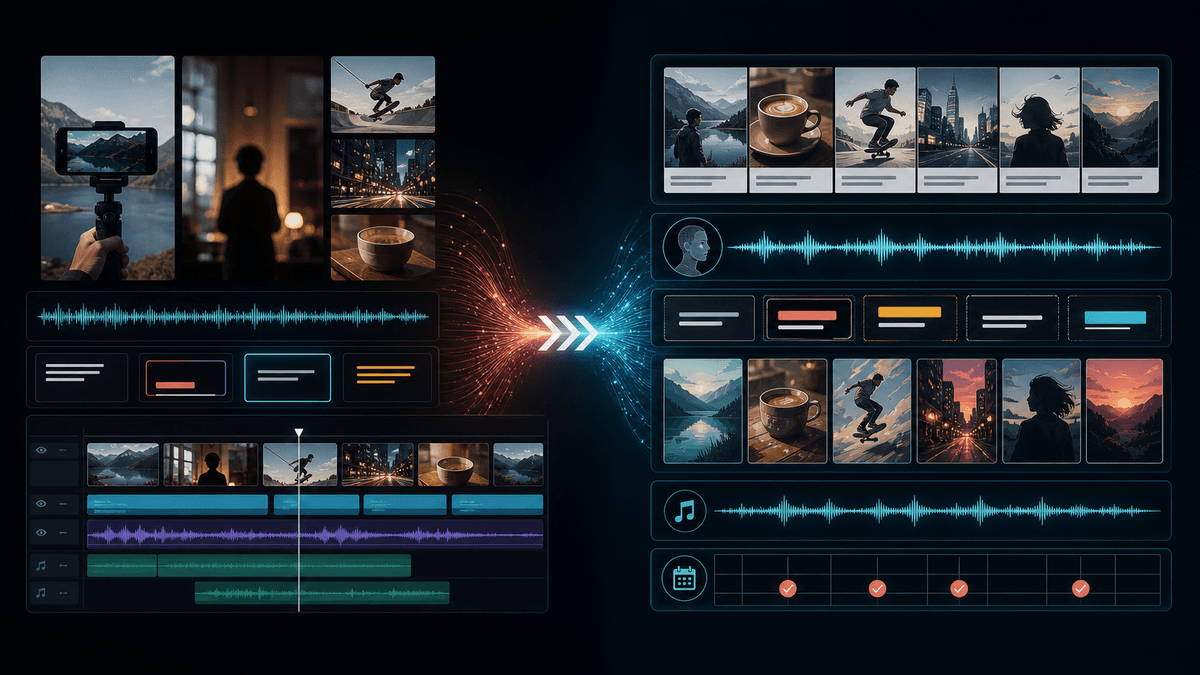
The best Submagic alternative is SwipeStory when you need to create the whole short from a prompt, topic, or script instead of adding captions and polish to footage you already have. Submagic is a strong caption-first editor for creators who record videos and want animated captions, B-roll, trimming, Magic Clips, and scheduling. Choose SwipeStory when your bottleneck is the complete faceless video workflow: hook, script, visuals, voiceover, captions, music, rendering, repeatable series, and scheduled publishing for TikTok, YouTube Shorts, and Instagram Reels.
Updated June 14, 2026. We checked Submagic's current homepage, AI caption generator page, B-roll page, Magic Clips page, social media scheduler page, and pricing page, plus SwipeStory's homepage, pricing page, faceless AI video generator, and YouTube's current Shorts documentation. Product packaging changes often, so use this as a workflow buying guide and verify live checkout screens before purchase.
Quick Verdict
| Need | Better fit | Why |
|---|---|---|
| Add animated captions to recorded footage | Submagic | Its public pages focus on upload-to-caption workflows, transcript editing, caption presets, B-roll, trimming, and exports |
| Turn long recordings into captioned clips | Submagic with Magic Clips | Magic Clips is built around extracting shorts from existing long-form videos |
| Create faceless shorts from a blank page | SwipeStory | Starts with a topic, prompt, or script and generates the video around it |
| Build a no-camera TikTok, Shorts, or Reels series | SwipeStory | Series creation, AI voiceover, visuals, captions, music, rendering, and scheduling are the core workflow |
| Need both workflows | Use both deliberately | Polish recorded clips with Submagic, then use SwipeStory for net-new faceless episodes |
If you already filmed a talking-head video, test Submagic first. If you do not have footage yet, start with SwipeStory's faceless AI video generator, Script to Video AI, or the AI caption generator guide.
What Submagic Does Well
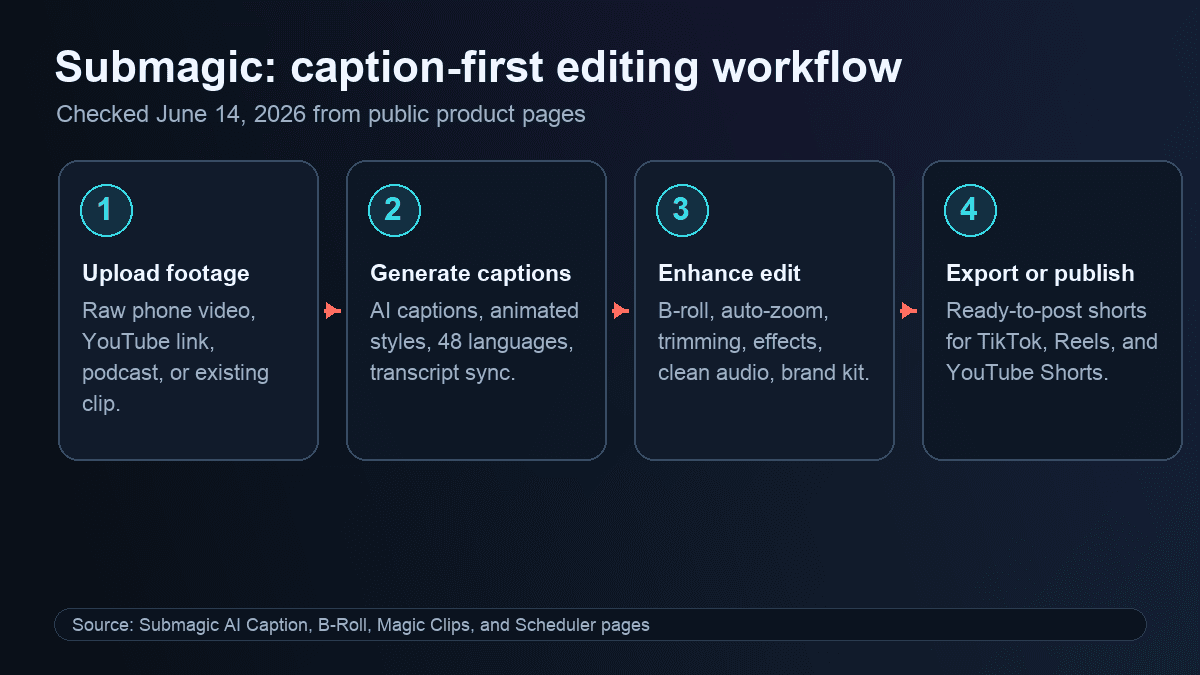
Submagic positions itself as an AI editor for short-form videos. Its homepage says it helps edit shorts faster with AI and lists features such as AI captions, AI auto edit, Magic Clips, trimming, AI actors, B-roll, subtitle generation, auto-zoom, eye contact, translation, images and GIFs, transitions, sound effects, background music, auto descriptions, clip making, video editing, publishing, API access, and integrations.
The Submagic AI caption page is the clearest fit for the core use case. It describes a workflow where creators upload a video or YouTube link, let AI create animated captions, then export and publish shorts for TikTok, Reels, and YouTube Shorts. It also presents product claims around 48 supported languages, 99% caption accuracy, animated caption presets, branded caption styles, text-based editing, and export readiness.
That makes Submagic useful when you already have recorded material. The video exists. Your job is to make it easier to watch, trim dead air, add more visual interest, style captions, and publish faster.
Submagic is worth testing if:
- You record talking-head videos, podcast clips, webinar snippets, interviews, sales videos, or UGC-style clips.
- Your main bottleneck is caption styling, trimming, and polish.
- You want transcript-based editing instead of traditional timeline editing.
- You need B-roll, auto-zoom, sound effects, clean audio, translation, or brand presets around recorded footage.
- You want to publish edited videos to TikTok, Instagram, and YouTube from the same editor.
The limitation is category fit. Submagic can improve videos you already have. It does not remove the need to decide the premise, write the short, generate original visuals, produce a voiceover, and assemble a faceless video from scratch.
Submagic Pricing Checked June 14, 2026
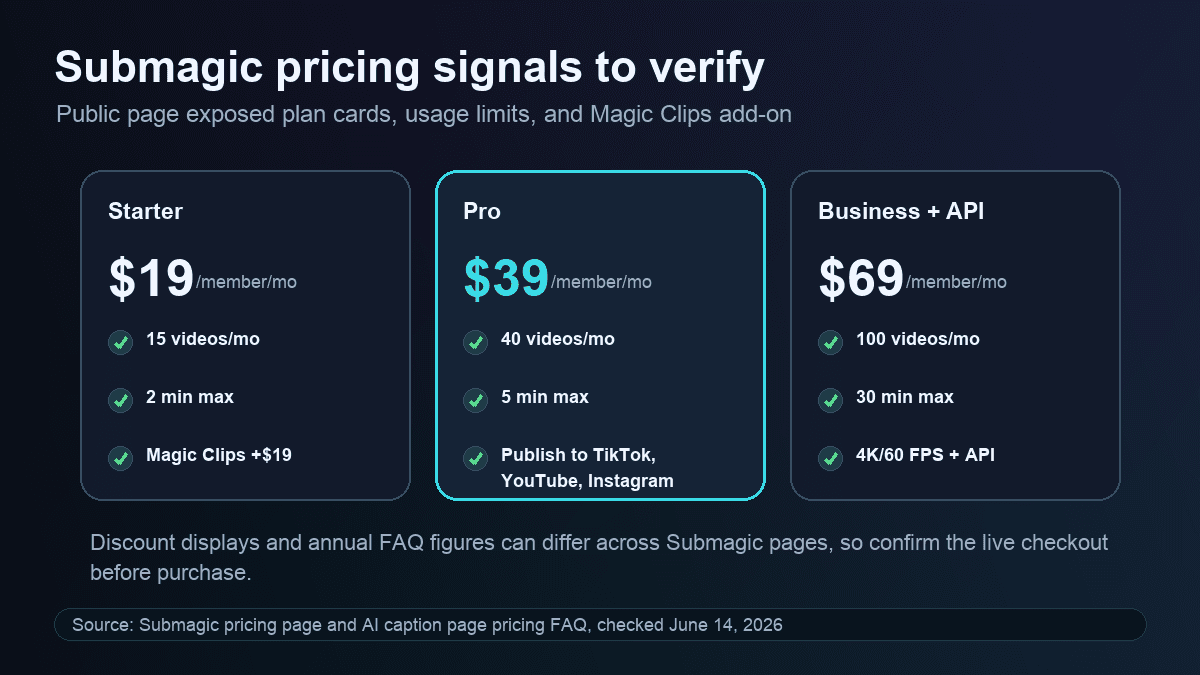
Submagic's public pricing page showed a 41% annual discount state and three main plan cards plus a custom plan. The visible plan cards checked June 14, 2026 showed Starter at $19/member/month, Pro at $39/member/month, and Business + API at $69/member/month. The same visible section showed Magic Clips as an add-on at +$19/member/month.
The important limits were not only the dollar amounts:
| Pricing signal checked | Starter | Pro | Business + API |
|---|---|---|---|
| Videos per member per month | 15 | 40 | 100 |
| Maximum video length | 2 minutes | 5 minutes | 30 minutes |
| AI credits | 3 | 6 | 15 |
| Export quality | 1080p and 30 FPS | 1080p and 30 FPS | 4K and 60 FPS |
| Notable upgrades | No watermark, AI captions, free B-rolls and audio, text trimming | Storyblocks B-rolls and audio, clean audio, silence removal, caption translation, brand kit, publishing | Custom templates, brand assets, custom dictionary, priority support, larger API limits |
There was one practical caution. Submagic pages can expose different discounted pricing language depending on the page and billing state. The AI caption page FAQ, for example, described lower annual monthly equivalents for Starter, Pro, and Business. Treat the plan limits, watermark rules, Magic Clips add-on, export quality, API minutes, and checkout total as the final comparison points.
For SwipeStory, the pricing page checked June 14, 2026 showed annual Summer Creator Sale pricing with Hobby at $16/month for 120 credits and one series, Creator at $31/month for 300 credits and two series, Influencer at $55/month for 600 credits and three series, and Studio at $174/month for 2,000 credits and five series. It also listed custom AI voiceovers, background music, auto-captions, no watermark, automated posting, and fast video generation across visible paid plans. Because that sale was scheduled to end June 14, 2026 at 11:59 PM, verify the current pricing page before comparing exact dollar amounts.
Submagic vs SwipeStory
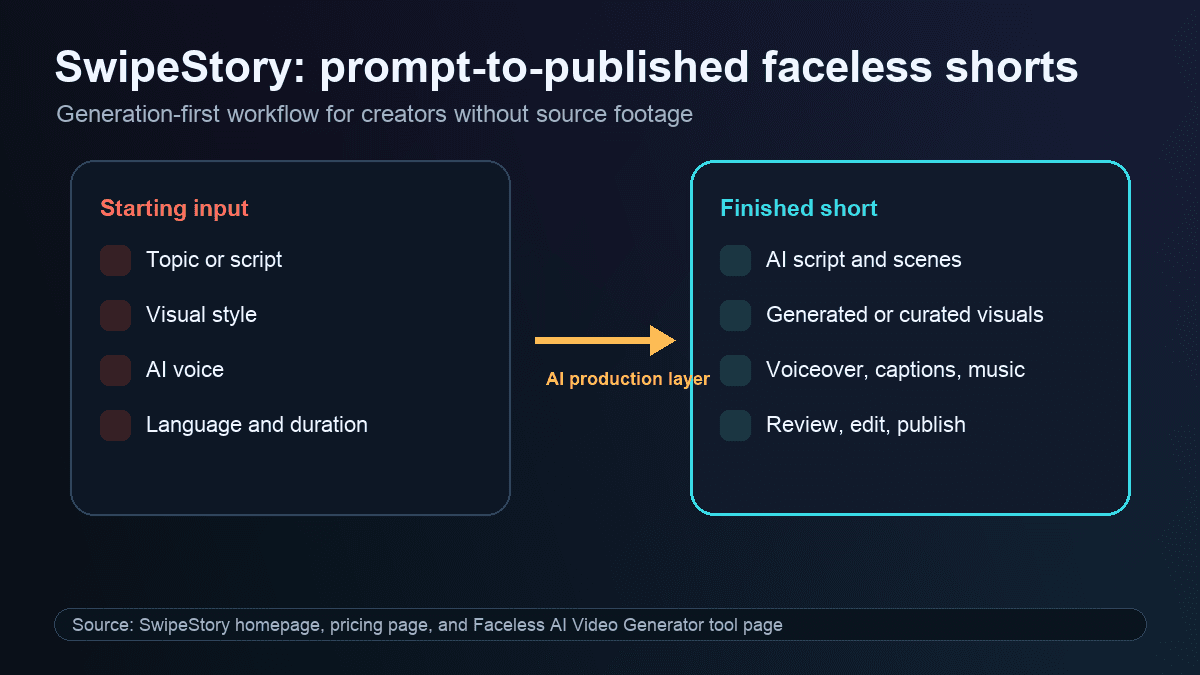
SwipeStory is the stronger Submagic alternative when your starting point is an idea, topic, prompt, or approved script. SwipeStory turns prompts or scripts into vertical videos with AI-generated visuals, voiceovers, captions, background music, editing, rendering, and scheduled publishing for TikTok, YouTube Shorts, and Instagram Reels.
SwipeStory's current homepage describes turning ideas into TikTok, Instagram, and YouTube stories, with the workflow handled from creation to publishing. Its faceless AI video generator page starts with a topic, lets creators choose a style, duration, language, and voice, then assembles the script, narration, visuals, pacing, and captions into a faceless vertical video.
The practical difference:
| Question | Submagic | SwipeStory |
|---|---|---|
| What do you start with? | Existing video, YouTube link, phone footage, podcast, webinar, or clip | A topic, prompt, script, or faceless series premise |
| Core job | Caption, trim, enhance, clip, and publish recorded footage | Create original faceless vertical videos from scratch |
| Best user | Creator, editor, agency, coach, advertiser, or team with recorded video | Creator building repeatable no-camera TikToks, Shorts, and Reels |
| Captions | Primary product value and editing layer | Part of the full generated video workflow |
| Visuals | B-roll and effects enhance footage that exists | AI-generated visuals and styles are part of the draft |
| Publishing | Public pages describe publishing and scheduling from the editor | Scheduled publishing is part of faceless video series production |
If you are comparing tools because caption work is taking too long, Submagic is a real contender. If you are comparing tools because you need more original short-form content without filming, test SwipeStory's AI TikTok video generator, AI YouTube Shorts generator, and AI Reel generator.
The Workflow Difference Matters More Than the Caption Styles
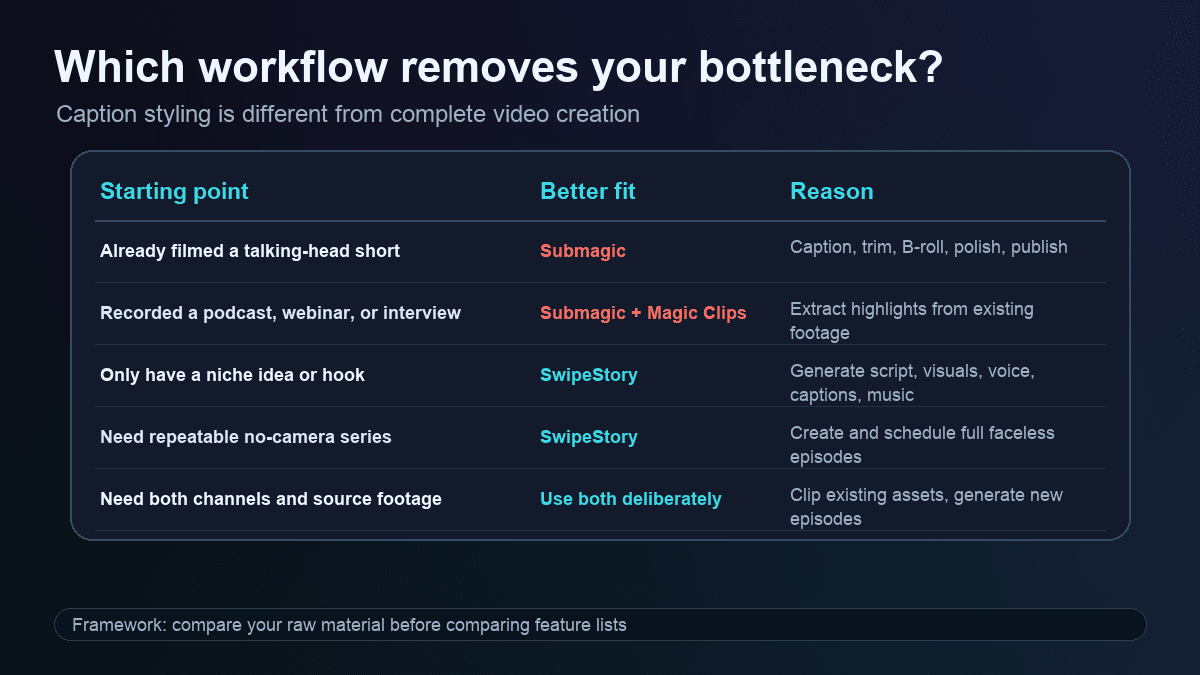
Most Submagic alternative searches are really asking one of two questions:
- "What is a better AI caption editor for videos I already recorded?"
- "What is a better way to make short-form videos without recording everything myself?"
Those are different buying decisions.
If the video already exists, the fastest path is usually caption-first editing. Upload the footage, generate captions, trim the dead air, add B-roll or zoom, review safe zones, and export. Submagic, CapCut, VEED, Descript, Captions.ai, and similar tools compete in that category.
If the video does not exist, caption-first tools can create hidden work. You still need to write the premise, record the footage, capture B-roll, generate or source visuals, record or synthesize a voiceover, assemble scenes, review pacing, and publish. A polished caption layer does not solve the blank-page problem.
That is where SwipeStory fits. It is better for creators who want a repeatable faceless channel and need the full production layer. The output still needs judgment and review, but the starting point is a prompt or script rather than a filmed clip.
When Submagic Is the Better Choice
Choose Submagic when your production system is footage-first:
- You film short talking-head clips and want faster captions.
- You publish UGC-style ads, founder videos, coaching clips, or creator videos.
- You already have long videos and want to use Magic Clips to extract more shorts.
- You want text-based trimming, B-roll, auto-zoom, clean audio, translation, or brand presets.
- You have an editor-led workflow where the final draft should still feel close to the original footage.
- You need to publish polished videos to TikTok, Instagram, and YouTube after editing.
For example, a coach who records ten phone videos every Monday probably should not start with a prompt-to-video tool. The raw material exists. The work is making each clip watchable, clear, captioned, branded, and ready for the feed. Submagic is aligned with that job.
Submagic's B-roll page also matters for this kind of creator. It says the product can understand the transcript and contextually add relevant B-roll, with manual control over clip, location, and style. That is useful when your footage needs visual relief but should still remain anchored to the original speaker or recording.
When SwipeStory Is the Better Choice
Choose SwipeStory when your production system is generation-first:
- You do not have source footage.
- You want to start with a topic, prompt, or approved script.
- You need AI-generated visuals, voiceover, captions, music, rendering, and scheduling in one workflow.
- You publish across TikTok, YouTube Shorts, and Instagram Reels.
- You want repeatable series organization instead of one-off edited clips.
- You are building a faceless channel where filming is not part of the process.
For example, a creator building a daily "weird science facts" channel does not need to dress a talking-head recording with captions. They need a hook, short script, scenes, relevant visuals, narration, background music, readable captions, and a consistent publishing rhythm. SwipeStory fits that job because the video starts from the idea.
That is also why AI video prompts for Shorts, TikTok hook examples, and faceless YouTube channel ideas pair naturally with SwipeStory. The bottleneck is not only editing speed. It is deciding what to publish next and turning that decision into a complete vertical video.
What About Magic Clips?
Submagic's Magic Clips page targets long-form repurposing. It describes turning long-form videos into viral shorts, extracting key moments, cutting clips, and applying captions, subtitles, audio cleanup, auto zoom, and templates. That is a valuable workflow when you already record podcasts, webinars, interviews, courses, or YouTube videos.
The category fit is similar to other AI clipping tools:
| Starting point | Better category |
|---|---|
| A 90-minute webinar | AI clipping and repurposing |
| A podcast recording | Magic Clips style highlight extraction |
| A finished YouTube video | Long-form to Shorts workflow |
| A list of niche ideas | Prompt-to-video or faceless video generation |
| A final 120-word narration | Script-to-video AI |
| A daily no-camera series | Faceless video generator with scheduling |
If you have a library of recorded content, Magic Clips can help you get more posts from that archive. If you are building a channel before you have footage, start with SwipeStory instead.
Publishing and Scheduling Comparison
Submagic's social media scheduler page says it adds AI captions, B-roll, and effects, then publishes to TikTok, Instagram, and YouTube. It also describes picking platforms, scheduling a date and time, letting AI generate platform-specific details, previewing posts, and publishing on schedule.
That narrows the gap between Submagic and broader short-form workflows. Submagic is no longer just "captions." It has expanded into edit, schedule, and publish from one workspace.
The important difference is still the input. Submagic's scheduler starts after you upload or paste a video. SwipeStory's workflow starts before the video exists. It helps build the script, scenes, voiceover, captions, visuals, and post-ready render.
For teams, the right answer may be both:
- Use Submagic to polish founder videos, UGC clips, podcasts, webinars, and raw social footage.
- Use SwipeStory to create net-new faceless videos for evergreen topics, educational series, story channels, and prompt-driven experiments.
- Compare the final outputs by review time, publishing consistency, production cost, and which workflow creates more approved posts per week.
Platform Rules Still Need Review
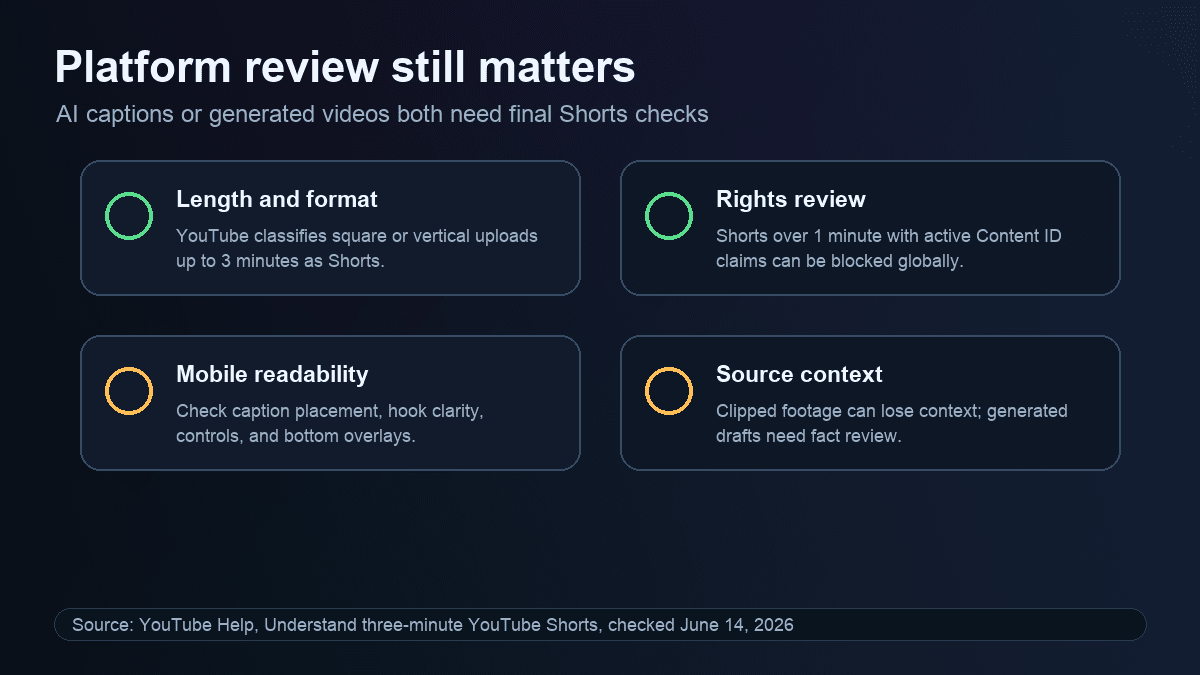
Both caption-first and generation-first workflows need a final platform review. YouTube Help currently says square or vertical videos uploaded after October 15, 2024 can be categorized as Shorts when they are up to three minutes long. It also says Shorts over one minute with an active Content ID claim of any type can be blocked globally until the claim is resolved.
That matters for Submagic and SwipeStory in different ways. A caption editor can inherit copyrighted music, unclear source footage, awkward context, or captions that sit under platform controls. A generated video can still need factual review, visual review, pacing review, and rights checks for music or source media.
Before publishing either type of draft, check:
- Is the hook clear in the first seconds?
- Are captions readable on a phone?
- Are captions, CTAs, faces, and important objects away from bottom controls?
- Does the clip make sense without the original long-form context?
- Are source clips, music, images, B-roll, and voiceover rights clear?
- Is the final length right for the platform and content type?
The best Submagic alternative is not the tool with the longest caption-style menu. It is the workflow that produces drafts you can approve quickly after checking format, rights, pacing, accuracy, and platform fit.
Buying Checklist Before You Switch
Use this checklist before choosing Submagic, SwipeStory, or another AI captions alternative:
- Define the raw material. Are you starting with recorded footage, long videos, scripts, images, or only topic ideas?
- Match the category. Use Submagic-style tools for existing footage. Use SwipeStory-style tools when the video needs to be created.
- Check limits that map to your workflow. For Submagic, inspect videos per month, max video length, Magic Clips cost, export resolution, API minutes, team features, and watermark rules. For SwipeStory, inspect credits, series limits, generation quality, AI voices, captions, and publishing coverage.
- Run a five-output test. One edited clip or one generated short is not enough. Produce five outputs and measure review time.
- Review on a phone. Desktop previews can hide caption crowding, low contrast, weak first frames, and bottom overlay conflicts.
- Count hidden work. Captions still require footage. Generation still requires topic judgment, source checking, and creative direction.
- Avoid feature-list buying. The better tool removes the bottleneck you actually have.
A Practical SwipeStory Workflow If You Are Moving From Submagic
If you tried Submagic and realized your real problem is original short-form creation, use this workflow in SwipeStory:
- Pick one repeatable premise, such as "one-minute psychology facts," "strange history stories," or "AI tools explained simply."
- Write five hooks using the TikTok hook examples guide.
- Turn the strongest hook into a 90- to 140-word script with one idea per scene.
- Generate a draft with a consistent voice, visual style, caption approach, and music direction.
- Review claims, visuals, pacing, captions, pronunciation, and CTA.
- Schedule the finished short, then create four more episodes with the same structure.
- Compare completion rate, saves, comments, and production time before changing the format.
The point is not to remove judgment. It is to remove repetitive production work so you can spend more time choosing stronger topics, writing tighter hooks, and improving the series.
Best Submagic Alternatives To Consider
1. SwipeStory: Best for Faceless AI Shorts From Prompts
SwipeStory is the best Submagic alternative if you want original faceless videos from topics, prompts, or scripts. It is strongest for no-camera channels, educational shorts, story videos, platform-specific drafts, and creators who want publishing connected to the same workflow.
Start with the faceless AI video generator for no-camera formats, Script to Video AI when your narration is final, or AI Shorts generator guide when you want the broader category view.
2. CapCut: Better for Manual Mobile Editing
CapCut is a good fit if you want free or low-cost mobile editing, hands-on timeline control, and basic AI caption help inside a familiar creator editor. It is less focused on full no-camera generation and series automation.
3. VEED: Better for Browser-Based Team Editing
VEED is worth comparing if you want captions, repurposing, screen recording, collaboration, and a browser editor. It can be a better fit for marketing teams that want editing control after AI does the first pass.
4. Descript: Better for Transcript-Led Editing
Descript is useful when you edit podcasts, screen recordings, webinars, or educational videos from transcripts. It is especially practical for teams that already think in terms of spoken scripts and text-based cuts.
5. OpusClip, Klap, or Vizard: Better for Long-Form Clipping
If your main workflow is turning long videos into many short clips, compare repurposing tools such as OpusClip, Klap, Vizard, and vidyo.ai or quso.ai. If you want a generation-first workflow instead, read our Klap alternative for Shorts, Vizard AI alternative, and Vidyo.ai alternative guides.
Frequently Asked Questions
Is SwipeStory better than Submagic?
SwipeStory is better than Submagic when you want to create original faceless shorts from prompts or scripts. Submagic is better when you already have footage and need captions, trimming, B-roll, Magic Clips, and publishing polish.
Is Submagic only an AI caption tool?
No. Submagic still has strong AI caption positioning, but its current public pages also promote Magic Clips, B-roll, auto editing, trimming, translation, scheduling, publishing, API access, and integrations. It is best understood as a caption-first AI editor for existing videos.
What is the best Submagic alternative for faceless videos?
SwipeStory is the best Submagic alternative for faceless videos because it starts with a topic, prompt, or script and builds the video around it with visuals, voiceover, captions, music, rendering, and scheduled publishing.
Should I use Submagic and SwipeStory together?
Yes, if you have both recorded footage and faceless content ideas. Use Submagic to polish clips you already recorded. Use SwipeStory to generate new shorts when you do not have footage or want a repeatable no-camera series.
Final Recommendation
Choose Submagic if your raw material is existing footage and the hard part is captions, editing polish, B-roll, trimming, or publishing from one editor. Choose SwipeStory if your raw material is an idea and the hard part is creating a complete faceless short without filming.
For most creators searching for a Submagic alternative because they want more content, not just better captions, SwipeStory is the better first test. Start with one topic, generate a complete faceless short, review it on a phone, then repeat the workflow five times before deciding which tool deserves a permanent slot in your production stack.
